KeyPress
KeyPress is a node that simulates pressing selected keys on the keyboard. Thanks to this node, macros and trees can "press" keys for the user to execute commands, send shortcuts, or emulate other actions in programs and games.
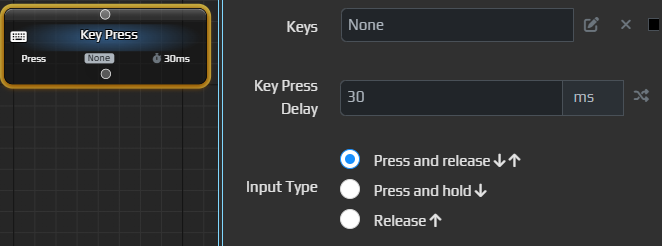
Main parameters
- Keys – choose one or several keys to press. You can specify single buttons (e.g., A) or combinations (e.g., Ctrl+C).
- Key Press Delay – delay between presses in milliseconds, making the input more human‑like.
- Input Type
- Press and release ⬇⬆ – a normal tap: the key is pressed and immediately released.
- Press and hold ⬇ – the key is pressed and held.
- Release ⬆ – only releases a key that was previously held.
Example
KeyPress

Keys: Ctrl + V
Key Press Delay: 30 ms
Input Type: Press and release
In this example the macro presses Ctrl and V together to paste text from the clipboard.
Long key combos
KeyPress supports only short single presses. For a long sequence use several KeyPress nodes one after another.