FAQ
Frequently asked questions and answers
What is EyeAuras?
EyeAuras is a clicker tool powered by computer vision and neural networks. It can analyze everything happening on your screen and perform actions on your behalf, such as moving the mouse and pressing keys. It can also play sounds, send messages to Telegram and over the Internet, and even run C# scripts.
How does EyeAuras work?
The program’s job is to capture the screen image, analyze it, and then perform actions based on what it sees—usually pressing keys or moving the mouse.
Everything in EyeAuras is built around making that easier. Triggers, actions, scripts, and behavior trees are all tools designed to help you build logic around what happens on screen in the simplest and most visual way possible.
No injects. The program works only with the screen and input devices.
What can you do with EyeAuras?
Here are some of the most common use cases, from simpler to more advanced:
-
Skill assistance
EyeAuras can monitor the state of defensive or offensive skills and press them when needed. The same logic works for HP potions, buff scrolls, and similar consumables. -
Alerts and notifications
The program integrates with Telegram, and with C# scripts you can send alerts almost anywhere—Discord, TeamSpeak, and more. For example, it can watch your screen and notify you when your character dies, gets a specific drop, and so on. Example of setting up Telegram alerts for L2.

-
Macros
You can configure entire action sequences that EyeAuras will execute when a condition is met. For example: if a buff expires, you can set up a sequence like “Teleport to town, run to the NPC, get buffed, cast a return scroll back to the farming spot.”

-
Mini-game automation
Many games include mini-games for fishing, gathering, and other activities. Here is a live example. -
Better farming efficiency through partial automation
Manually selecting targets and pressing your rotation can get tiring. You can hand that job over to a robot pretty quickly—and it will gladly take it. Here is an auto-target example.
And here is a rotation setup example. -
Trigger Bot
This category of aim bots appeared relatively recently and is very easy to implement in EyeAuras. The program can analyze what is under the cursor and press the fire button for you when a certain set of conditions is met. And thanks to neural networks, it is not limited to simple color checks—you can train a model to shoot at specific body parts. -
Building a full custom user interface
This is where programming starts to come in. For your own set of auras, you can quickly create a custom interface that looks the way you want it to.
In practice, this means you can build what is called a MiniApp—a small, compact app inside EyeAuras. https://wiki.eyeauras.net/ru/scripting/getting-started
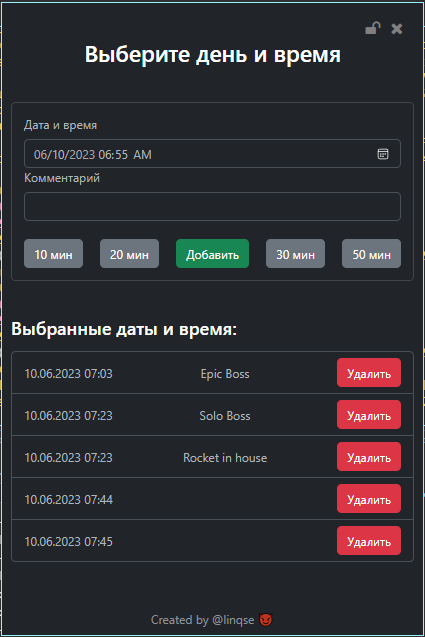
This feature appeared about a year ago. Below are examples of interfaces created by community members, all built directly inside EyeAuras.


-
Adding whole functional modules to games with C# scripts
For example, you can fit a script set into roughly 10 lines that mutes the game when it is minimized. Tutorial video: https://www.youtube.com/watch?v=r4oHqHBpj-c
P.S. The program interface has changed a lot since then, but the core idea is still the same. -
(Any) Bot
The most advanced thing you can build with EyeAuras is a full bot that uses modern neural network and computer vision techniques. This is not a trivial task and does require programming knowledge. In this setup, EyeAuras is essentially a platform you can use to develop and distribute a bot without worrying about protection, capture performance, image processing, and similar low-level concerns. This can save you months of work and let you focus on the logic itself.
What can I actually do with EyeAuras in games like L2, Albion, PoE, and similar titles?
Lineage 2
This is where the program started, and many of its features were tested on it. Over the years, people have built everything from simple PvP helpers (auto-heal, defensive ability usage, and so on) to full farming bots for specific locations. One such bot will be published in the coming weeks and made available at no extra cost.
- Farming, spoil, crafting, lamp automation, automatic shopping with return to the spot, better farming efficiency through smart targeting—you name it.
Path of Exile
In this game, EyeAuras is mostly used as a farming assistant. Here are some possible use cases:
- Flask usage under specific conditions. This is less relevant since auto-potions were introduced, but automation can still use flasks more efficiently than the game’s built-in system.
- Skill usage, buff upkeep, and warcry maintenance
- Automatically resummoning minions if they die
For aurabots:
- Auto-follow
- Support and automatic use of Vaal skills as they charge
- Entering and leaving maps on command
Any MMO RPG
- Configure character rotations with behavior trees
- Automate crafting
- Automate gathering, either partially (collection only) or fully (collection plus storage)
- Fishing is usually very easy to automate—there have already been examples for Lineage 2, Lost Ark, and Albion
What games does EyeAuras support?
EyeAuras works only with the screen and input devices, so the answer is: any game. That includes both full MMORPG clients and something like controlling a BlueStacks emulator running a mobile game. From EyeAuras’s point of view, there is no difference.
There are only two exceptions, and both are related to Lineage 2. The program does not officially support free servers run by the E-Global and MW/Expanse teams.
Do I need programming skills to write a script in EyeAuras?
The short answer: no.
EyeAuras was designed as a tool for advanced gamers—people who understand their games well and are smart enough to build logic, but who are not expected to be programmers.
The longer answer: programming expands your possibilities a lot.
The most advanced and powerful things—like full bots—are often tens of times easier to build when at least part of the logic is written in code. With the arrival of behavior trees, many things that used to require code can now be done in the visual editor. Even so, behavior trees also include nodes that let you execute C# code, and in many cases that still makes development easier.
Is EyeAuras free?
EyeAuras uses a Freemium (= Free-to-Play) model, which means you can download it and start using it completely free of charge, with no time limits. If you buy a license, you unlock additional functionality.
More details are available here.
Can game anti-cheats detect EyeAuras?
As long as the program is running on the same computer as the game, it can potentially be detected. At that point, it becomes a question of how much effort the software team is willing to invest versus how much effort the anti-cheat team is willing to invest.
Over the program’s lifetime, there have been several such “cycles” of this kind of arms race, the latest involving EasyAntiCheat. There have been no reports of automatic bans for many months, but that does not mean the software is completely safe to use—it only means that in the current “cycle” the program is not being detected. This cat-and-mouse game can continue indefinitely, until one side decides the cost of continuing is too high.
Important: because EyeAuras is built entirely around computer vision, it does not have to run on the same PC as the game. With a cheap capture card and one of the specialized USB input emulation devices, you can build a setup where EyeAuras runs on a separate computer and sends control commands remotely. In that kind of setup, automatic bans become simply impossible. I will explain how to build this separately.
What limitations does EyeAuras have?
There are no specific hard limitations at the moment.
How can movement be configured in EyeAuras without maps or path mapping?
Movement and navigation in bots built on computer vision are a very difficult topic. Just a few years ago, this was considered almost impossible without some kind of anchor points or built-in navigation systems from the game itself, such as auto-run and similar mechanics. However, over the last two years, neural networks with segmentation support have developed very rapidly. EyeAuras not only supports this mode of operation, but also includes a number of optimizations to keep performance at a good level.
This is roughly what the result of mini-map processing by a neural network can look like—this is how your bot can understand what is around it. It is very similar to how real robots move in the physical world: they scan the environment with sensors, and then begin navigation based on that information.
Here is an example of radar-based navigation by linqse—a neural network recognizes the positions of mobs on the radar and moves toward them.
And here is another one, also by linqse—this version navigates by recognizing mob names.
This area is still very difficult and requires strong programming and algorithmic skills, but it is clearly the future, and EyeAuras is moving in that direction.
I’m a multiboxer. How can EyeAuras help me?
For multiboxers, I see three main tools that can help:
-
Window control through network messages
Running EyeAuras instances can communicate with each other: they can send and receive messages, and you can configure how the program reacts when it receives a specific text. For example, it is very easy to create commands like “Stop,” “Follow me,” “Start looting,” and similar actions. It does not matter where your windows are running—on a neighboring computer or on a cloud GPU server—the message will still arrive. -
Alerts and notifications
When you are managing many windows, it is not always possible to keep track of everything happening in each one. Running out of potions or other consumables, a character getting stuck, and similar situations can all be monitored without much trouble. -
Orchestration
Launching 20 game windows for a farm setup is tedious, and restarting them after a disconnect is even worse. You can build a system with EyeAuras and scripts that monitors the state of the game, connection, and character, then automatically takes corrective action. Disconnect? Fine—restart the game, log in, accept party invite, and keep going.
Does EyeAuras get in the way when playing on a single game window?
EyeAuras was originally designed specifically as a tool to help gamers gain an advantage in combat—to press what your hands do not have time to press, show what your eyes do not have time to notice, and so on. So using it with a single game window has always been, and still is, one of the most effective ways to use the program.
Can EyeAuras work with multiple windows on the same PC at once?
Yes, but there are some limitations. The program can observe multiple windows at the same time, but it can only send input to one window at a time. EyeAuras is still trying to behave like a real human, and a real human can only press buttons in the currently active window.
That said, this does not mean multi-window automation is impossible. It just means that when input is needed, the program will activate the required window first. The important part is designing your automation so that your scripts do not fight for control and try to send input to different windows 50 times per second.
Can you show videos of EyeAuras working in real scenarios?
All materials below belong to community members:
Channel linqse - https://www.youtube.com/@eyesquad-cv9ii
Lineage 2 - bot by linqse
AimLab - shooting balls by linqse
GTA5 - automatic CAPTCHA recognition using a neural network by linqse
GTA5 - collecting absolutely everything possible using neural networks by linqse
Lineage 2 - remote bot control by linqse
Lineage 2 - farming mobs in the catacombs by Quo. The “spiderweb” on the right is a visualization of the character’s logic. EyeAuras controls two windows at the same time. Sorry for the quality—it was 2021, and it was recorded on a potato.
Escape From Tarkov - an early prototype of a program that uses neural networks to recognize, evaluate (via the auction), and visualize (small triangles in the corners of some items) item quality, by Tony