Dependencies Viewer
displays the dependency structure of Auras, providing a visual representation of their interconnections
Dependencies Viewer
The Dependencies Viewer Overlay in EyeAuras provides a visual representation of the dependency structure of Auras. It allows users to get a quick overview of how different Auras are interconnected and depend on each other. This can be especially useful for complex configurations where many Auras interact in intricate ways.
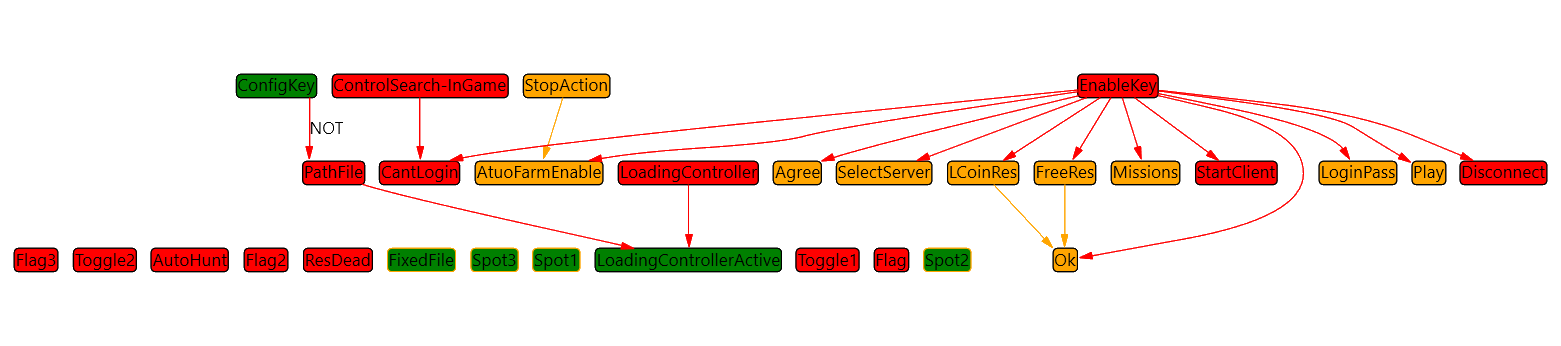
Common options
You can refer to the common overlay options here: Common Options
Display Auras
You can specify which Auras you want to display in the Dependencies Viewer. This can be useful when you want to analyze the dependencies of a specific set of Auras.
Highlight Active Auras
This feature allows you to visually distinguish between active and inactive Auras. Active Auras will be highlighted, making it easier to understand the current state of your configuration.
Gaming Applications
- Visualize the dependency structure of your Auras in a multiplayer game to optimize your configurations.
- Monitor the activation state of game-specific Auras in real-time during gameplay.
- Analyze the interdependencies of your Auras in a strategy game to better understand how they interact.
- Debug your Aura configurations in a role-playing game by tracking their activation and dependencies.
- Refine your Aura setup for a racing game by visualizing how different Auras depend on each other.
- Use the overlay to simplify the process of troubleshooting Aura dependencies in a first-person shooter game.
- Understand the relationship between Auras tied to character abilities in MOBAs (Multiplayer Online Battle Arena).
- Get a visual overview of your complex Aura configurations in a simulation game.
- Track the activation of Auras related to in-game events in a real-time strategy game.
- Analyze and optimize Aura dependencies for effective resource management in a survival game.