NuGet/Assembly References
Reference external assemblies
Put reference directives in Script.csx, the script's entry point. Ordinary helper
classes use the resulting namespaces and types without declaring their own #r.
Use Script Properties
Open the script and choose Properties.

The NuGet tab lets you search packages, select a version, add or update the
reference, and remove an installed reference.
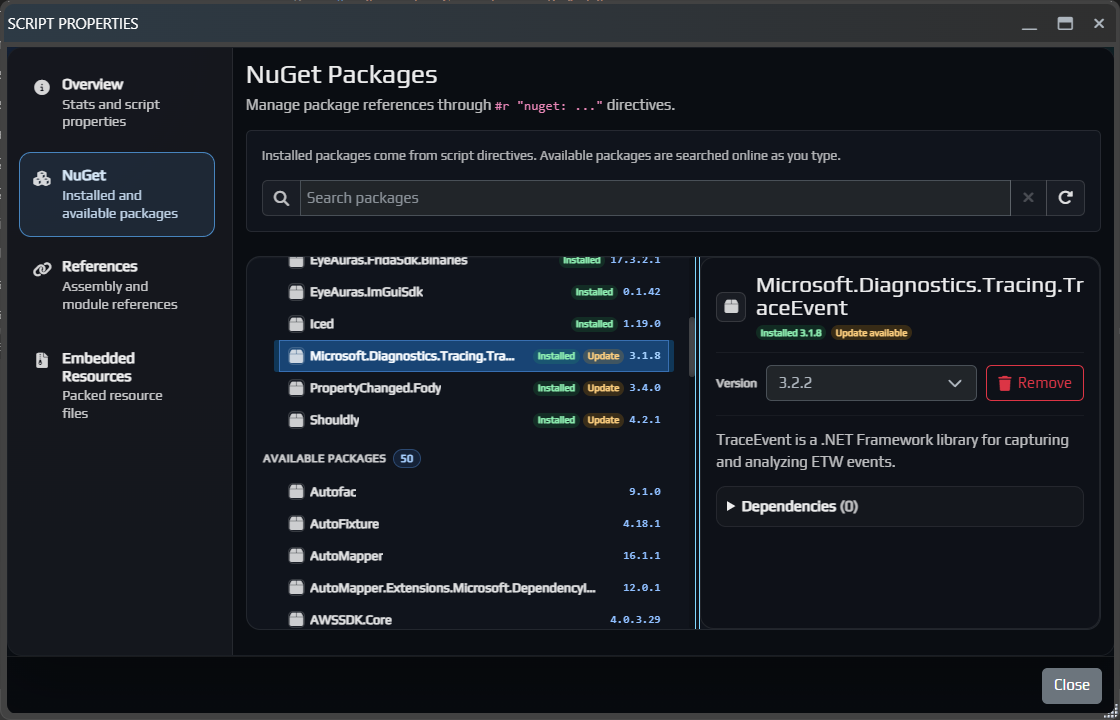
Select a package and version, then choose Add Package or Update Package.
The neighboring References tab adds an assembly available in EyeAuras or an
external DLL by path. These controls edit the same reference declarations used
by #r; restoring and loading the dependency are separate steps. Read script
diagnostics for version, package-server or loader errors. Arbitrary native assets
and MSBuild targets do not become supported merely by adding a reference.
Reference a NuGet package and call it
Specify an exact package ID and version in Script.csx:
#r "nuget: Newtonsoft.Json, 13.0.3"

using Newtonsoft.Json.Linq;

var settings = JObject.Parse("{\"delayMs\":250}");
var delayMs = settings.Value<int>("delayMs");
Log.Info($"Delay: {delayMs} ms");
After restore and compilation succeed, the Event Log shows Delay: 250 ms.
An Installed Packages entry alone does not prove successful restore or loading.
Package availability and binary compatibility depend on the feed and your runtime.
References make types available; some SDKs also require a
container extension to register services.
Use Properties to update/remove the reference, or edit the directive manually.
Reference a DLL by path
Supply an existing compatible DLL. This example path must be replaced with your own; it is not copied automatically to another machine. For distribution with the script, use embedded resources. One DLL reference does not guarantee that all of its dependencies can be loaded.
#r "assemblyPath: D:\Work\EAExile\EAExileAgent.Shared.dll"

Log.Info("Assembly reference declared"); // Check diagnostics and the required types
See resolution rules for the separate embedded-resource and disk paths. Do not assume a relative disk path is always based on the exported project directory.
Reference an assembly by name
This requests metadata available to the host. It does not download a missing library
or install a runtime. It can resolve assemblies already loaded by EyeAuras or
through Assembly.Load, subject to the host metadata resolver. Presence in the
.NET Framework GAC alone does not establish availability in this host.
#r "assemblyName: Grpc.Net.Client"

Log.Info("Assembly reference declared"); // Not a network-call test
Historically EyeAuras referenced more than 300 assemblies by default. Do not depend on that historical inventory: declare the dependencies needed by your own script.
Choose a reference form
Use a versioned NuGet package when one is available. Use a local DLL path when the library is not packaged and the file exists on that machine. Package DLL resources when they must travel with the script. Use assembly-name references only for metadata the host can already resolve.