Telegram Message
listens for user-specified messages sent across Telegram channel, allowing for synchronized control and data sharing
This trigger allows you to configure reactions on receiving messages in some Telegram group.
Use Send Telegram Message action to automatically send notifications about something
Trigger settings
As with all other text-matching triggers this trigger supports Text Match Expressions
Prior to usage of this trigger you'll have to establish Telegram bot which will maintain the channel subscription. It is quite an easy task, but could be a bit overwhelming first time you'll try to do it, luckily, there is a number of different guides out there in the web.
The most crucial part of that process is retrieving Token, which will be used by EyeAuras to impersonate Bot and retrieve messages from the channel
Helpful docs about TG bots:
- Official docs, BotFather section: Документация Telegram: Боты (tlgrm.ru)
- Instruction with images on how to configure chat-bot: Как подключитьTelegram чат-бот | SendPulse
Setting up Telegram Bot / Group
To setup Telegram notifications you have to do 3 things:
- Create Telegram Bot - it will be used to send you notifications. This is how you'll get
Telegram Bot Token. You can either use an existing bot or create a new one following instruction below - Create a group or add your Telegram Bot to existing group - this is where messages will be sent. You can add another bot named
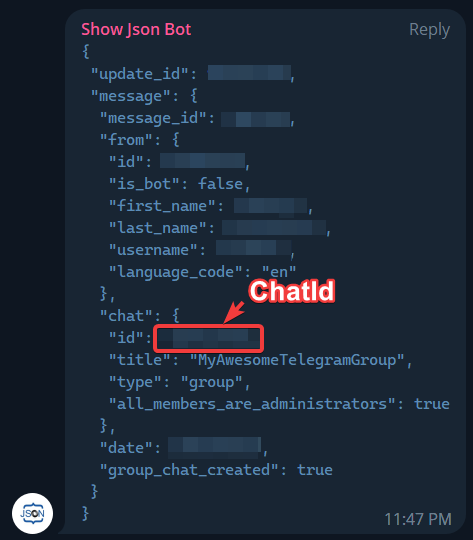
Show Json Botto getTelegram Chat Idof the group. - Configure Send Telegram Message by putting in
Telegram Bot TokenandTelegram Chat Id
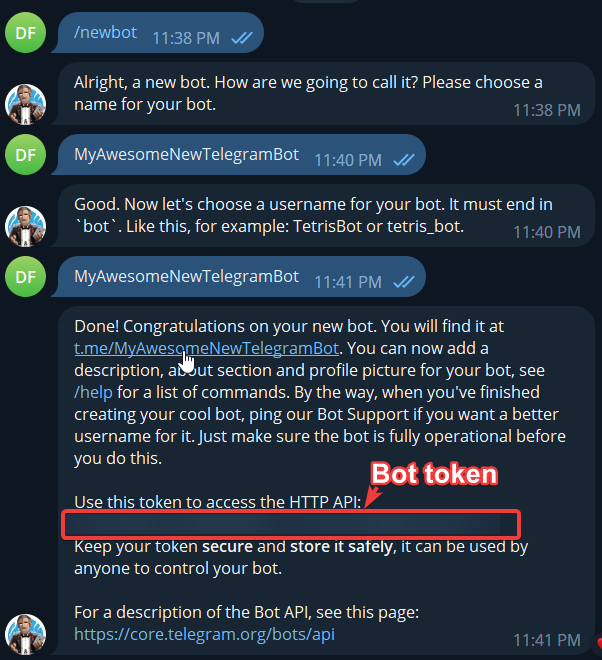
How to get Telegram Bot Token
- Open Telegram client (desktop/mobile does not really matter)
- Find bot
BotFather - Type
/newbot - Choose and type some name for your new bot, it does not have to be unique, e.g.
MyAwesomeNewTelegramBot - Choose and type username for your new bot, it has to be unique and has to end with “bot”, .e.g
MyAwesomeNewTelegramBot(it will be taken and you'll have to pick something new) - That's it! If you've done everything correctly,
BotFathershould provide you withBot Token
Example:
How to get Chat Id
- Create new group in Telegram or open existing one
- Click on Add Member button
- Find and add
YOUR_BOT_NAME(username of the bot you've created previously, e.g.MyAwesomeNewTelegramBot) - Find and add
Show Json Bot(important! Name must be exactly that, there are many different bots with similar names) - (optional) Click on Create - this is needed only if you're creating a new and fresh TG group
- Show Json Bot will print a JSON which will contain ChatId