Troubleshooting
What to check if training, the model, or integration is not working
Diagnostics
This page helps you quickly figure out where the pipeline is breaking: data, labeling, training, ONNX, or EyeAuras.
Prerequisites
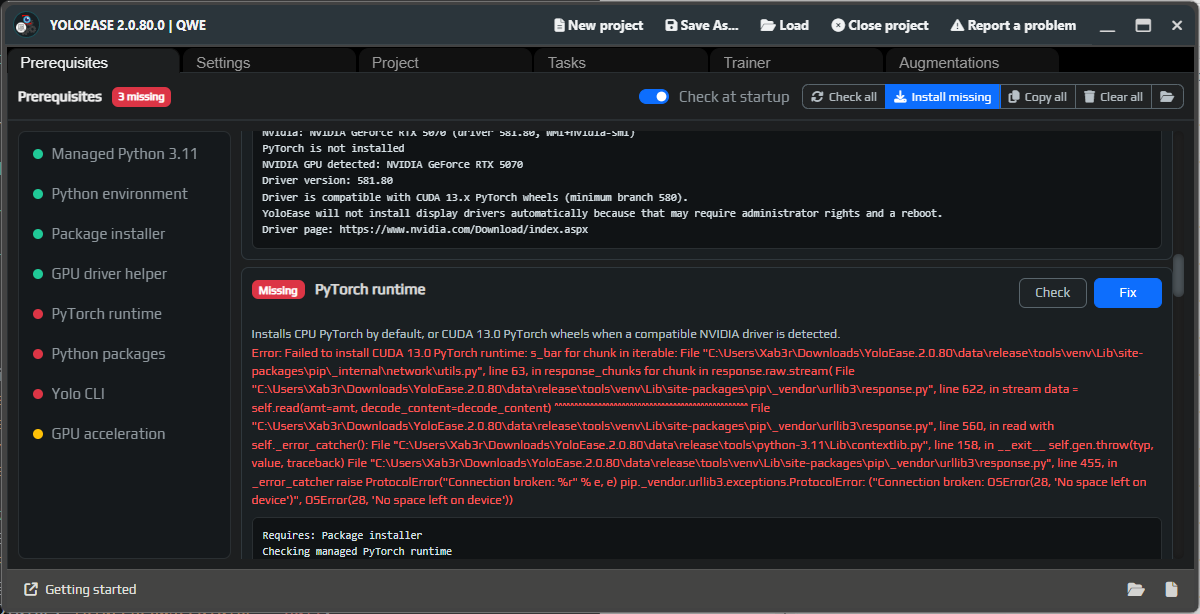
If Prerequisites are not green, fix those first. Local training will not start without managed Python, PyTorch, Ultralytics, and the ONNX tools.
| Symptom | What to check |
|---|---|
No space left on device | Free up space on the project drive and in the managed Python folder or download cache. |
| CUDA is not being used | Check PyTorch runtime in Prerequisites; to force CPU mode, you can add device=cpu. |
| Installation fails | Click Check all, then Install missing; look at the error text on the component row. |
| YOLO asks to update | Update Ultralytics through the UI if YoloEase suggests an update. |
Dataset
| Symptom | What to check |
|---|---|
| Training does not start | The dataset must contain at least one frame in train and one frame in valid. |
| A rare class does not learn | Add more examples of that class; it may have ended up in only one split. |
| Too many false positives | Add negative frames without boxes: menus, pauses, empty background, similar colors. |
| The model confuses classes | Check labels in the editor and add counterexamples for both classes. |
| Too many near-identical frames after importing video | Increase Frame step or choose a shorter Range. |
Train/Validation % split does not guarantee a good split by itself. Before a serious training run, make sure all important classes appear in different situations, not only in one short video segment.
Labeling
| Symptom | What to fix |
|---|---|
| The model misses objects | Label more similar positive frames. |
| Bounding boxes are inaccurate | Adjust the boxes so they tightly fit the visible part of the object. |
| Auto-labeling is damaging the dataset | Do not accept suggestions blindly; remove false positives before Finish Job. |
| An object is sometimes labeled and sometimes not | Decide how to label that case and do it consistently everywhere. |
Model suggestions are not included in training until you click Accept or Accept all.
Training
| Symptom | What to check |
|---|---|
data.yaml not found | Rebuild the dataset through Trainer; check completed jobs. |
No best.pt | YOLO did not finish training; check the progress feed and the error text. |
| ONNX export error | Make sure best.pt exists and that the model is a YOLO object detection model. |
| Not enough VRAM | Reduce Model Size, use yolo11n.pt, lower batch, or add device=cpu. |
| Windows uses too much memory | Do not increase workers unless needed; YoloEase uses workers=0 by default. |
On small datasets, metrics can be unreliable. Do not look only at mAP — also check real predictions in YoloEase and the OSD in EyeAuras.
ONNX
| Symptom | What to check |
|---|---|
| The model does not load | It must be an Ultralytics YOLO export for object detection, ideally opset 17. |
| Class names are missing | Use label mapping in the editor or check the names metadata. |
| An external ONNX model does not work | The program running the model must support YOLO output parsing and NMS. |
A .pt file is selected in EyeAuras | ML Search requires .onnx; keep .pt for training. |
EyeAuras
| Symptom | What to check |
|---|---|
| It works well in YoloEase but poorly in EyeAuras | Compare the capture region, window scaling, effects, and the loaded .onnx. |
| Bounding boxes are offset | Check the capture region and effects before ML Search. |
| Clicks go to the wrong place | Enable OSD first, then Mouse Move, and only add the click action after verification. |
| The model sees objects that are too small | Add Width Min and Height Min in ML Find Class. |
If the issue only happens in a real scenario, record a short video of that exact problem through EyeAuras, add it to YoloEase, label it, and train a new generation.
See also: Trainer, YOLO ONNX and model weights, EyeAuras integration.