YOLO ONNX and Model Weights
What YOLO, .pt, ONNX, model sizes, and opset mean
YOLO ONNX and model weights
YoloEase trains YOLO models through Ultralytics and then exports the result to ONNX after training starts. Right now, the main supported workflow is detect, meaning object detection with bounding boxes.
What YOLO is
YOLO is a family of object detection models. A YOLO model takes an image and returns a list of detected objects: class, confidence, and bounding box.
In YoloEase, the main use case is object detection. For example:
tgt— a target on the screen;btn— a button that should not be clicked as if it were a target;enemy,loot,hp_bar— any other classes you train yourself.
Segmentation, pose, and classification models can also be called YOLO, but they produce different outputs. For YoloEase auto-annotation and ML Search, use object detection models.
Which versions to use
In Settings, there is a Yolo8/10+ base model field. You can enter a base model name there, such as yolo11s.pt, or a path to a local .pt file.
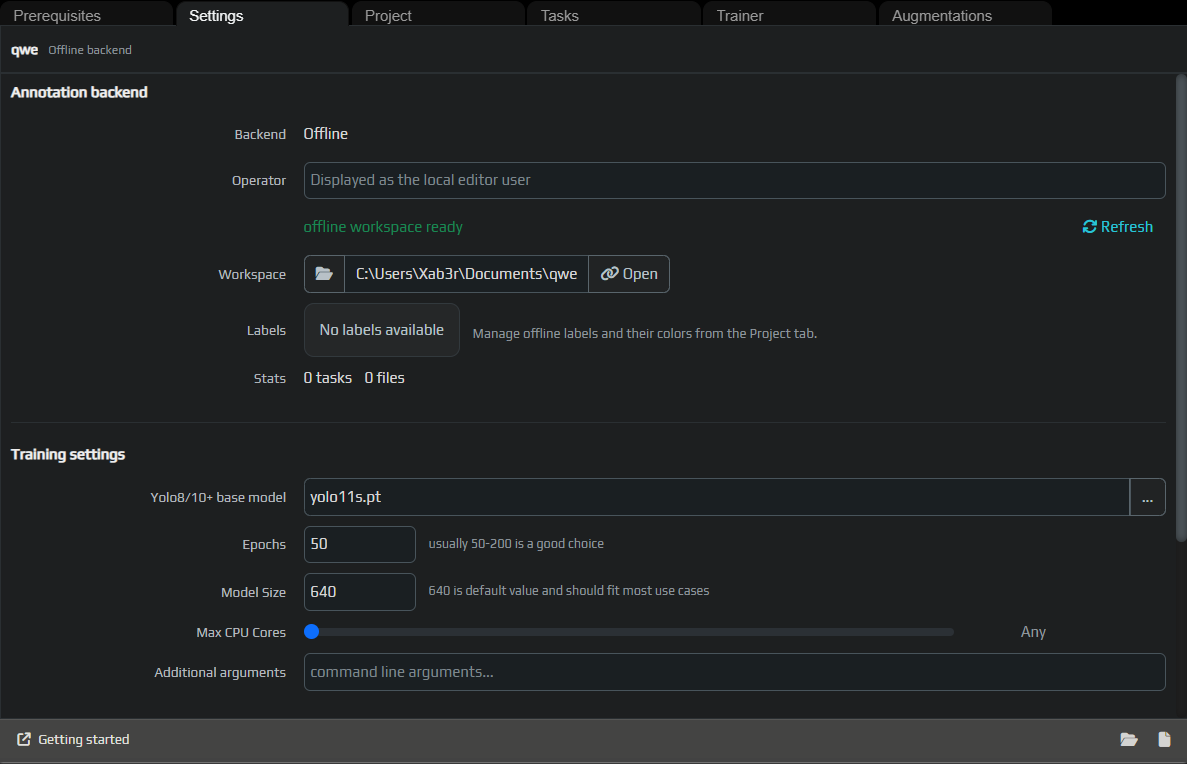
Ultralytics supports multiple YOLO generations. In practice, the generation number matters less than compatibility with the current Ultralytics version, quality on your dataset, and whether the model can be exported to ONNX.
If you are not sure where to start, use a small model like yolo11s.pt. It is usually better than nano, while still being fast enough for experiments.
Model sizes
The suffix in the model name usually indicates its size:
n— nano, faster and lighter, but it may struggle with more complex objects;s— small, a good starting balance;m— medium, better quality but slower training;landx— large models that need more VRAM and more time.
For screen-based models, n or s is often enough, especially if your labels are simple and the capture area is small.
What .pt is
.pt contains PyTorch weights. This format is used for training, fine-tuning, and working through Ultralytics.
After training starts, you will usually get:
best.pt— the best epoch according to validation metrics;last.pt— the weights from the last epoch.
If you want to continue experimenting in YoloEase or Ultralytics, keep the .pt files.
What ONNX is
.onnx is a portable model format used for inference. YoloEase exports ONNX after training, and EyeAuras uses this file in ML Search.
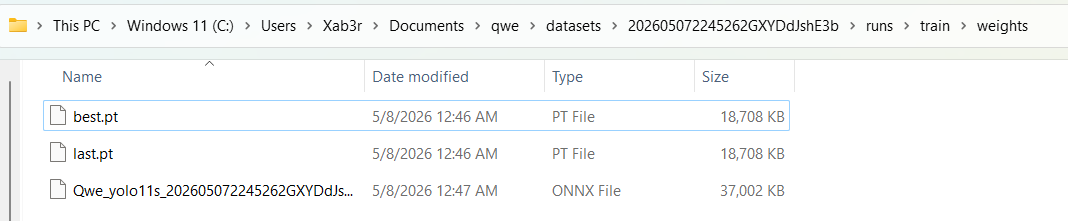
ONNX is useful because it can be loaded into a runtime environment without the full Python training stack. That is exactly what automation needs: the model works as part of an EyeAuras workflow.
ONNX does not mean the file will work in any program automatically. The program must be able to read YOLO object detection output, parse detected boxes, and understand class names.
Compatibility
| Requirement | Recommended |
|---|---|
| Task type | detect, object detection |
| Export | Standard Ultralytics YOLO export |
| Runtime format | .onnx |
| Opset | 17 if the model was exported by YoloEase |
| Metadata | Preferably includes names so classes can be read automatically |
| Input size | Matches imgsz, for example 640 |
| Runtime program | Must support YOLO output parsing and NMS, not just “any ONNX” |
Opset
Opset is the version of the ONNX operator set. YoloEase exports models with opset 17 because it is a good compatibility choice for the current ONNX Runtime and the YoloDotNet pipeline.
Typical opset-related problems:
- the model was exported with an opset that is too new and does not load in the runtime;
- the model was exported with older tools and does not contain the required metadata;
- the model was trained for a task type your runtime does not support;
- a custom export changed the input or output shape.
If a model does not load in EyeAuras, first make sure it is actually an ONNX object detection model exported with standard Ultralytics export.
If you downloaded a model from the internet and it is segmentation, pose, classification, or a custom export, it may not work even if the file extension is .onnx.
Metadata and labels
An ONNX model can include class names. If those names are present, EyeAuras and the task editor can display labels more clearly. If the metadata is missing, or the names do not match your project labels, use label mapping in the annotation editor.
For EyeAuras, use .onnx. .pt is needed for training and fine-tuning, but not for ML Search.
Demo weights
See also: Trainer, EyeAuras integration, diagnostics.