Augmentations
Why augmentations are useful and how to use them in training
Augmentations
Augmentations create additional variations of images you have already annotated. This helps the model learn to recognize an object under small visual changes instead of memorizing one ideal version of it.
In YoloEase, augmentations are configured on the Augmentations tab and applied when the dataset is built before training.

When to use them
Augmentations are useful when:
- you have only a small number of annotated frames;
- the object may look slightly different because of noise, motion, scale, or compression;
- you want to improve model robustness without manually annotating hundreds of similar frames;
- validation shows that the model learned the training frames too well but performs poorly on new ones.
Do not enable effects just because they are available. If the object never appears flipped or rotated in your real scenario, Flip and Rotate will only confuse the model.
How to add an augmentation
- Open the
Augmentationstab. - Click
Add. - Choose an effect and configure its parameters.
- Make sure the checkbox for that effect is enabled.
- Start the next training run through Trainer.
The list shows the effect name, its parameters, and a Remove button. The checkbox lets you disable an effect temporarily without deleting it.

How it works
YoloEase does not modify the original images or the original annotations. During the training cycle, it takes the annotation files, creates modified copies, and adds them to the dataset before splitting it into train and valid.
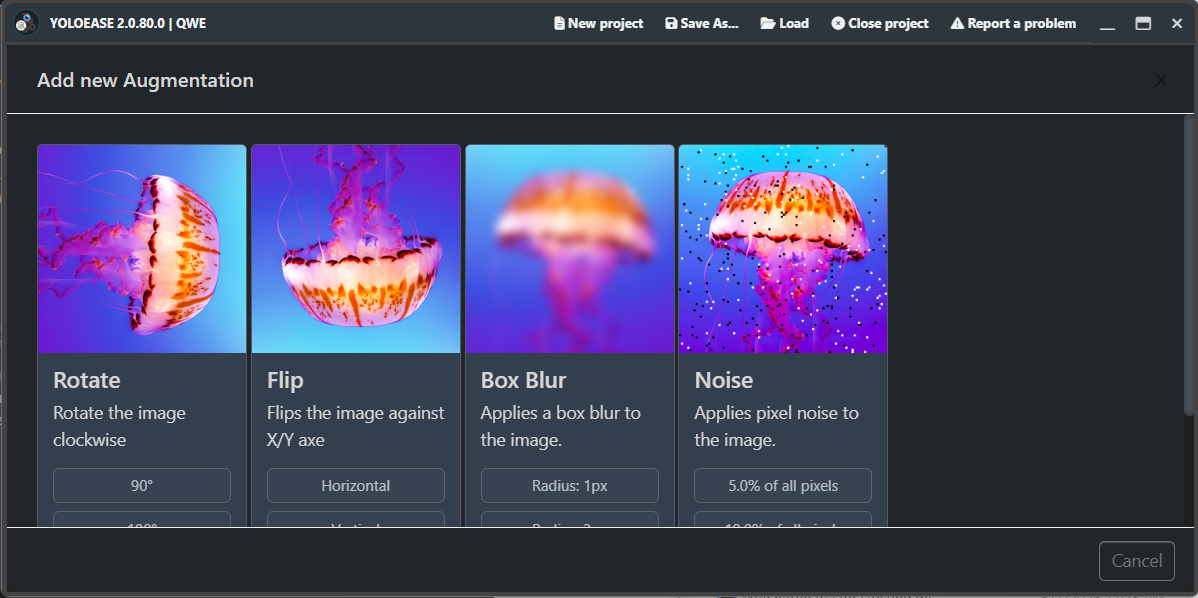
For Rotate and Flip, YoloEase recalculates the bounding boxes so they stay aligned with the correct objects. For Box Blur and Noise, geometry does not change, so the boxes stay in the same place.
If several effects are enabled, each enabled effect creates its own image variant. This is not a combinatorial mix of all effects at once: Noise and Blur will produce two extra copies, not a third Noise+Blur copy.
Because augmentations are added before the split, metrics may look better than reality. The original image and a very similar augmented copy can end up on opposite sides of train and valid. Always test the model on real captured images, not only on the training graph.
Rotate
Rotate turns the image clockwise by 90, 180, or 270 degrees.
Use it only if the object can actually appear in those orientations. For UI buttons and text elements, rotation is almost always harmful: a real interface button will not suddenly appear rotated by 90 degrees.
Flip
Flip mirrors the image either Horizontal or Vertical.
Horizontal flip is useful when the left and right sides of the screen are interchangeable. Vertical flip is needed less often, because in most interfaces the top and bottom of the screen mean different things.
Box Blur
Box Blur adds blur with a radius of 1, 3, 5, or 10px.
Start with 1px or 3px. Larger values can destroy small objects, especially if the target occupies only a few pixels.
Noise
Noise adds noise to 5, 10, 20, or 50% of pixels.
Start with 5%. Strong noise is useful only if your real image capture is actually noisy. Otherwise, the model will learn from images it will never see in practice.
Practical rule of thumb
For your first training run, it is usually better to skip augmentations and see what the model can already do. Once you have initial predictions, add one mild effect such as Noise 5% or Box Blur 1px and compare the next training graph.
If the model fails on specific real frames, add those frames and annotate them first. Augmentations strengthen a dataset, but they do not replace real examples.
If you use EyeAuras effects while recording the training video, enable the same effects before recognition in EyeAuras. Otherwise, the model is trained on one visual world and used in another.
See also: annotation and training, Trainer, YOLO ONNX and model weights, diagnostics.