Early alpha feature. You can already build very usable things with it, but the surrounding infrastructure is still evolving quickly.
¶ What is a mini-app
A mini-app is your own application built on top of EyeAuras.
From the outside it can look like a standalone program, while under the hood it uses existing infrastructure:
- C# scripts
- automation
- image capture and memory features
- custom user interfaces
- pack distribution
- updates
- sublicenses
- script protection
It can be anything:
- a small utility
- a clicker
- a bot
- a launcher
- a specialized helper tool
The idea is simple: you focus on your logic and your product, while EyeAuras provides a large part of the underlying infrastructure.
If you want to see a live example, here is one:
¶ Mini-app vs regular pack
A pack by itself is just a distribution format.
A mini-app is a scenario where your script or project becomes the center of the product, while the EyeAuras UI moves into the background or disappears entirely.
Short version:
- regular pack: the user still mostly works through the EyeAuras UI
- mini-app: the user mostly works with your UI and your flow
That is why mini-apps are usually built around EyePad and a specific set of launch arguments.
¶ Two common paths
¶ 1. One file, one script
This is the fastest path.
You write one .csx or .cs file that:
- draws the interface
- handles buttons and input
- performs automation
- stays alive for the full lifetime of the app
This approach is great for:
- prototypes
- small utilities
- simple internal tools
- first mini-apps
The easiest starting point is ImGui. It is the fastest way to build your own UI directly inside a script.
¶ 2. A full project
Once one file is no longer enough, you can move to a full C# project:
- export the script into a
.sln - open it in Rider or Visual Studio
- work through Live Import
- use multiple files, classes, and projects
In that mode you can build much more serious applications:
- with Blazor Windows
- with Embedded Resources
- with external NuGet packages
- with your own launch and authentication logic
At that point a mini-app stops being "just a script to try something" and starts becoming a proper product.
¶ Why EyePad matters here
Technically, a mini-app usually runs through EyePad, meaning:
EyeAuras.exe --pad
This mode is especially good for:
- launching the target script immediately on startup
- working with your own UI
- hiding most of the standard EyeAuras interface
- the model where "my script is the app"
In the portable version, there is usually an EyePad.vbs file that simply runs EyeAuras.exe --pad.
¶ How a mini-app is usually built
¶ 1. Create the script
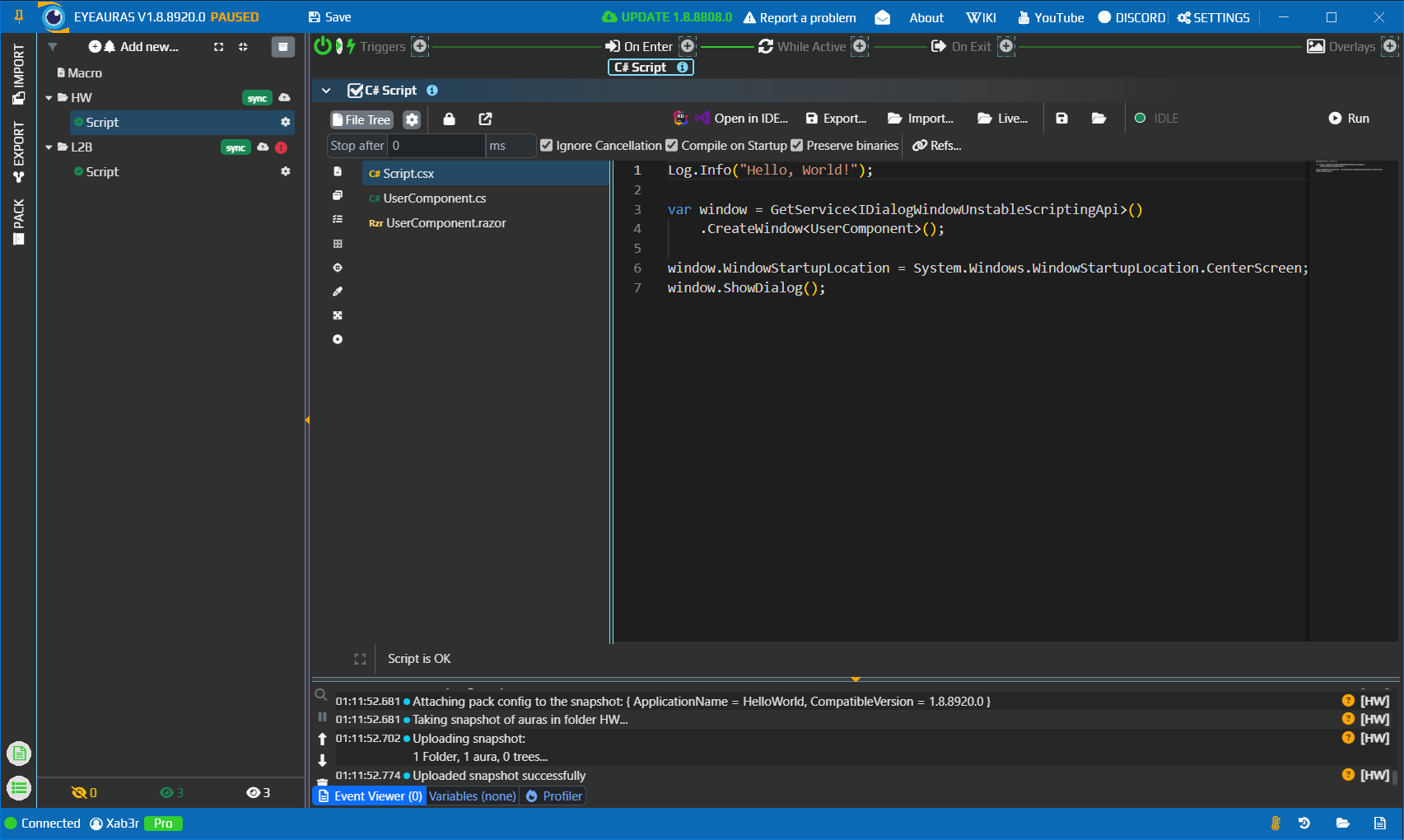
The simplest option is to create a folder, add an aura, and place your main script there.
The key idea is this:
in a mini-app scenario, your main script is the app.
That means:
- the program starts
- EyeAuras loads the required infrastructure
- the target script starts
- when that script exits, the app usually exits too
That is why the main script is expected to live for the full lifetime of the mini-app.
¶ 2. If the project grows, open a .sln
Once the logic becomes larger, it is usually better to move to a standard IDE workflow:
- export
- Rider / Visual Studio
- import
- Live Import
More details are here:
¶ 3. Publish the pack
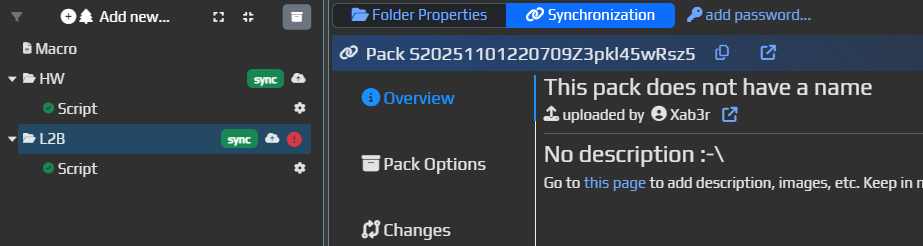
Once the script or project is ready, publish the folder as a pack.
After that, the user can download a ready-made portable version that already contains everything needed to run the product.
¶ 4. Configure launch behavior through Pack Config
The next important step is to tell the pack how exactly it should start.
This is done in Synchronization -> Pack Config.
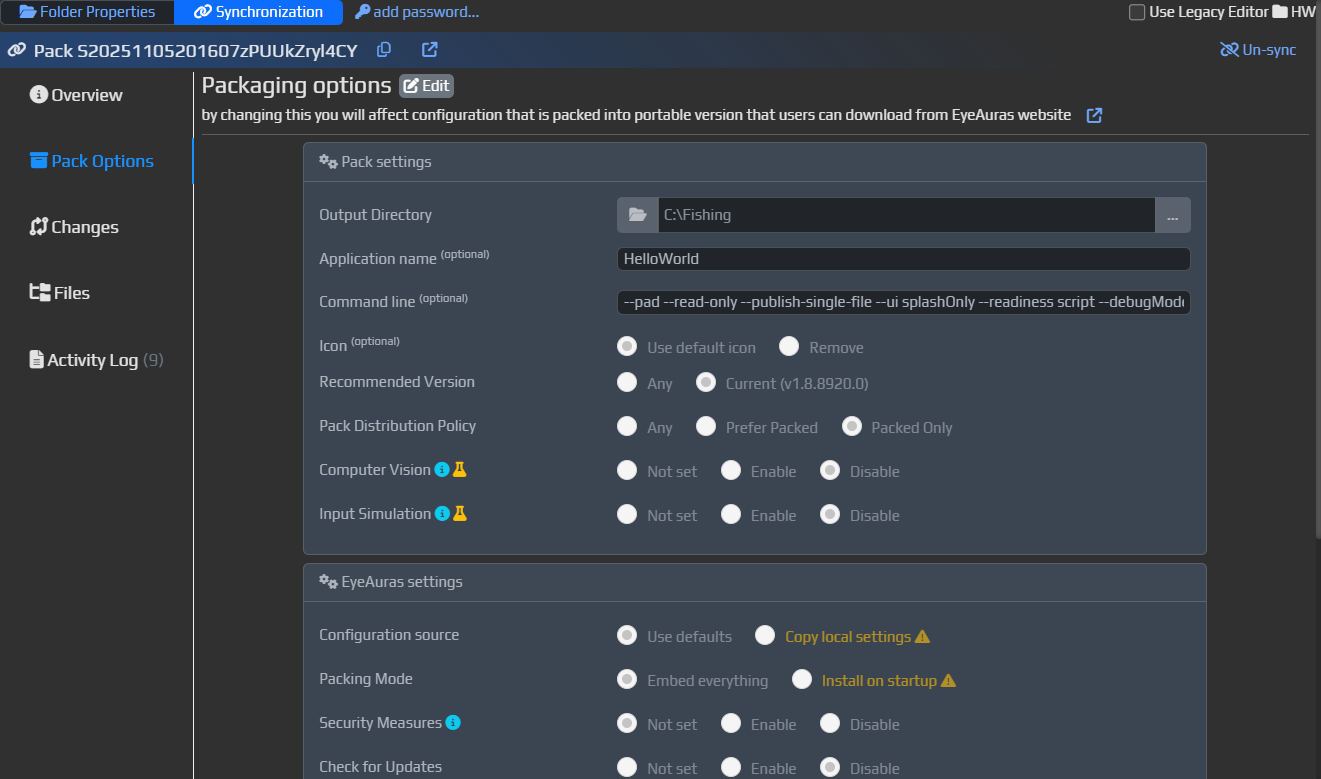
This is where you can enter extra command-line arguments:
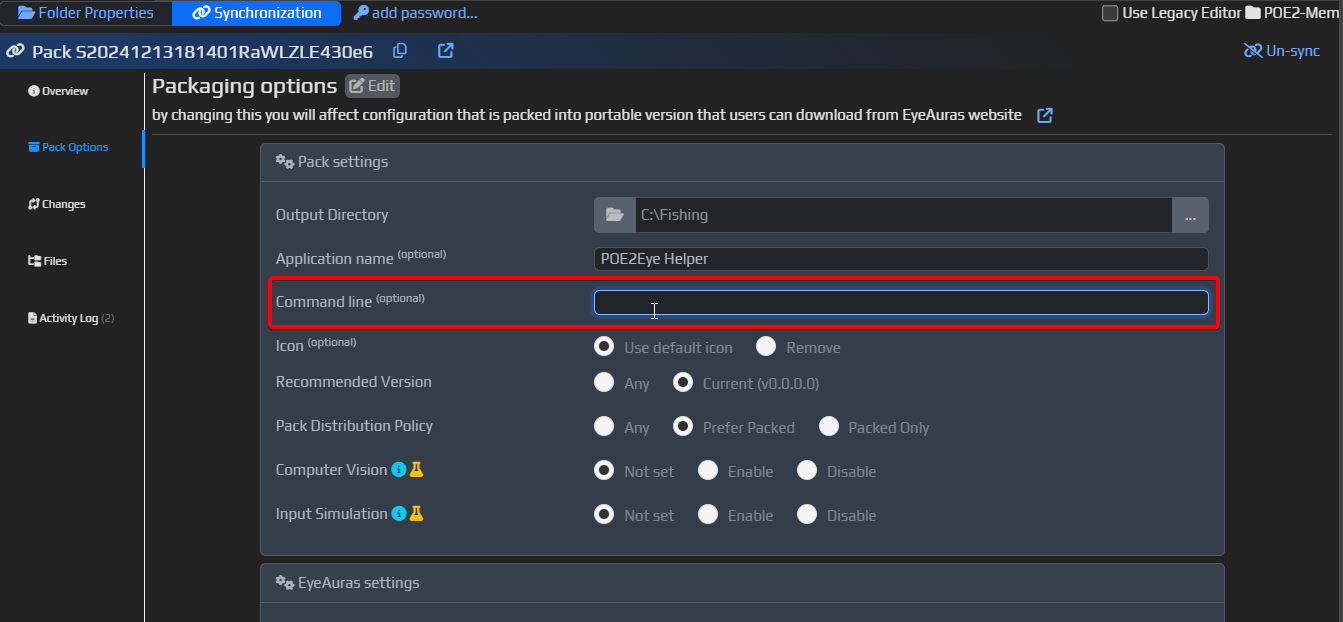
After that, the user does not need to type anything manually. Those launch arguments live directly in the pack configuration.
¶ A typical command line
Here is one of the typical mini-app launch configurations:
--pad --read-only --publish-single-file --ui splashOnly --readiness script --acceptLicense "config/auras/HW/Script.json"
Broken down:
--padenables EyePad mode. This is the base launch mode for mini-apps.--read-onlymeans changes to auras, macros, trees, and scripts are not persisted between launches. This makes behavior more predictable.--publish-single-filetells the server-side packing pipeline that you want the most self-contained build possible, potentially down to a single executable.--ui splashOnlyshows only the splash screen and does not open the main EyeAuras window.--readiness scripttreats the app as "ready" not when EyeAuras itself is loaded, but when your target script is actually ready. This usually feels better for mini-app UX.--acceptLicenseallows skipping the standard EyeAuras license agreement window. This is intended for mini-app scenarios."config/auras/HW/Script.json"is the target file that should be opened and started at launch.
That final argument is what makes the app go directly into your script instead of waiting for user actions.
¶ What --ui and --readiness do
These two settings strongly affect the overall feel of the application.
¶ --ui
Controls how much of the EyeAuras UI is visible to the user.
The most common mini-app values are:
normalfor the usual modesplashOnlyfor splash screen only, with no main window
If the goal is to hide EyeAuras and leave only your own UI, splashOnly is usually the right choice.
¶ --readiness
Controls who decides when the app is considered "ready."
appmeans EyeAuras decidesscriptmeans the target script decides
For mini-apps, the second option usually feels better because the splash screen disappears closer to the moment when your own UI is actually ready.
¶ What you can use inside a mini-app
There is no "scripts only" limitation here.
Inside a mini-app you can use:
- C# code
- NuGet packages
- images, videos, fonts, and DLLs through Embedded Resources
- UI built with ImGui
- UI built with Blazor Windows
- standard auras, macros, and behavior trees
- paid access through sublicenses
So a mini-app is not a separate new project type. It is a way to package existing EyeAuras capabilities into a product with the UX you want.
¶ Which UI should you choose
If you want the fastest possible start:
- choose ImGui
- keep it to one file
- keep it to one script
- keep infrastructure light
If you want a richer and more visual interface:
- choose Blazor Windows
- use multiple files and components
- move to a
.slnand an IDE when needed
¶ Can it work without a separate UI at all
Yes. Not every project needs to be a "real app with windows."
Sometimes a mini-app can look like:
- one background script
- one overlay
- a tiny control panel
- a bundle of auras and automation
But the more you want to move away from the look and feel of regular EyeAuras, the more useful EyePad plus your own UI becomes.
¶ What the end user gets
The ideal flow looks like this:
- you write the script or project
- you configure the pack
- you add the required launch arguments
- you publish it
- the user downloads the ready-made portable version
- the user launches it like a normal app
In the best case, the user does not even need to think about the fact that EyeAuras is underneath. They just see your product.