Peformance - Logs
Changing log level may positively affect application performance but will drastically reduce chances of finding/fixing potential issues via logs.
Log level usually defines how important corresponding message is. Examples:
- TRACE Lowest possible level, disabled by default because amount of logs will be simply unmanageable. Stuff like memory allocation is logged with this level.
- DEBUG Stuff like application behaviour is logged here. Usually it's useful only for app developer
- INFO Messages which could potentially be understood and interpreted by end-user
- WARN This level is used when something unexpected/unusual has happened and it may potentially affect app behaviour, but it is not critical. For example, if application update server is not available it's unpleasant, but not life-threatening
- ERROR Something really bad has happened. In many cases it may lead to bugs and in worst cases it may crash application
By default, EyeAuras uses DEBUG log level.
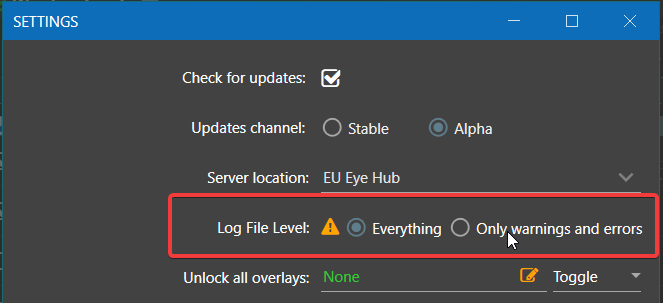
How to change log level manually via UI
- Open Settings
- Switch to “Only warnings and errors”
- Click Save
- That's it. You do not need to restart the app or do anything else - from now on, app will log only warnings and errors.
How to change log level manually via log4net.config
- Open the following directory(copy&paste into Explorer): %localappdata%\EyeAuras
- There will be multiple versions of EyeAuras (usually there are 2 versions, latest and backup). When you start EyeAuras latest version is used in all cases.
- Go to folder with latest version, e.g. for EyeAuras v1.2.4177 folder will have name “app-1.2.4177”
- Open file “log4net.config” in your favourite text editor
- Find the following line “”, usually it's at the very bottom
- Change “DEBUG” to “WARN”
- Save file
- From now on, only messages of WARN and ERROR level will be saved to log files thus drastically reducing any requirements for disk I/O
That's it. There is no need to restart EyeAuras as it will automatically apply your changes. This will work only until application will update to the next version. You will have to repeat all steps after update. There is no built-in mechanism (yet) for changing log-level.