Bundle help text and your own reference image
Package text and a supplied PNG with a script project, read the text through its file provider and display both in an owned window.
Bundle help text and your own reference image
Keep a small help card with the project so it does not depend on a personal disk path. The script reads packaged text; a Razor component displays that text and your own PNG in one window.
You need desktop EyeAuras with the script-hosted Blazor window services and WebView2 Runtime. Use a C# Script action, whose Run can remain active while its window is open. This entry point is not the short setup script of C# Overlay.
-
Create your own aura
RecipeHelpand add Actions → On Enter → C# Script for manual Run. In its project, use New file → Component, name itMainWindow, and replaceMainWindow.razorbelow. If that template also createdMainWindow.cs, remove that generated file from this new project; the complete component here is a single Razor file. -
Prepare a UTF-8 file
help.txtcontaining the exact text below and an actual non-sensitive reference PNG you own. This Wiki does not supply the image. In the script file tree, choose Add → Existing File(s)... to import both as resources. Use Rename to give them the project pathsdocs/help.txtandimages/reference.png.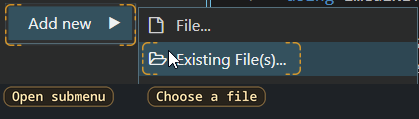
Choose Existing File(s)… here for your help.txt and image.
-
Replace Script.csx with the complete file below. Keep exactly one resource matching each logical path, with the spelling and folder case shown. The component namespace is
RecipeHelp; it need not equal the generated project's namespace. -
Wait for compilation and click Run. A window titled Project reference should show all three help lines and your supplied image. Resize it: the image keeps its aspect ratio and fits the available width.
-
Close the window to finish this Run, or click the action's Stop. The close wait ends or is cancelled, then the owned window is disposed. A new Run reads the packaged text again.
Script.csx
using System;
using System.Reactive.Linq;
using System.Reactive.Threading.Tasks;
using PoeShared.Blazor.Wpf;
using RecipeHelp;
using System.IO;
using EyeAuras.Repl;

{
    var files = GetService<IScriptFileProvider>();
    var helpFile = files.GetFileInfo("docs/help.txt");
    var imageFile = files.GetFileInfo("images/reference.png");
    if (!helpFile.Exists || !imageFile.Exists)
        throw new FileNotFoundException("Add docs/help.txt and images/reference.png to this project.");
    string help;
    using (var stream = helpFile.CreateReadStream())
    using (var reader = new StreamReader(stream))
        help = await reader.ReadToEndAsync(cancellationToken);
    using var window = GetService<IBlazorWindow>();
    window.ViewType = typeof(MainWindow);
    window.DataContext = help;
    window.Title = "Project reference";
    window.Width = 480;
    window.Height = 320;
    var closed = window.WhenClosed.Take(1).ToTask(cancellationToken);
    window.Show();
    try { await closed; }
    catch (OperationCanceledException) when (cancellationToken.IsCancellationRequested) { }
}
MainWindow.razor
@namespace RecipeHelp
@using PoeShared.Blazor
@inherits BlazorReactiveComponent<string>

<h2>Project reference</h2>
<pre style="white-space: pre-wrap;">@DataContext</pre>
<img src="images/reference.png" alt="My supplied reference image"
     style="max-width: 100%; height: auto;" />
docs/help.txt
Project reference
This help text belongs to this script project.
Compare the image below with your own original PNG.
| Part | Responsibility |
|---|---|
IScriptFileProvider | Borrowed service exposing this project's resources; do not dispose it. |
CreateReadStream() and StreamReader | Owned readers, closed before the window is shown. |
DataContext = help | Passes a string explicitly to BlazorReactiveComponent<string>. |
images/reference.png | A relative resource URL served by this script-aware window at its page base URI, not a Windows file path. |
WhenClosed then Show() | Subscribes before showing, then awaits closure inside the window's owning block. |
The current provider can resolve a unique folder-qualified suffix of an embedded manifest name, such as ProjectName.docs.help.txt. Keep resources unambiguous; the actual project namespace contributes to full manifest names, not the component's @namespace. If lookup fails, inspect typeof(MainWindow).Assembly.GetManifestResourceNames() in the script log and the imported files; embedded resources explains exact names and export packaging. Direct Assembly.GetManifestResourceStream has its own exact-case contract.
Replacing a file on its original disk does not update the packaged bytes. Reimport or replace the resource and recompile. Export/import of the complete project carries its resource content; moving an isolated .csx does not. File-provider reading covers the separate physical-file option. Show() is non-modal. Awaiting closure keeps the window inside this Run's owned scope.