¶ EyeAuras Script FAQ and Best Practices
EyeAuras scripts are regular C# code that runs inside the EyeAuras runtime environment. They work well both for tiny 20-line utilities and for larger solutions that can later grow into a pack or a mini-app.
For AI-assisted API research, start from AI Discovery Maps. They route broad questions to focused maps and separate base SDK concepts from optional packages such as ImGui SDK and Frida SDK.
¶ The most important distinction: Script.csx vs regular classes
This is one of the most important concepts in the whole system.
Code inside Script.csx goes through special EyeAuras processing:
- it runs inside the sandbox
- it has direct access to
Log,Sleep(...),GetService<T>(),AuraTree,Variables,cancellationToken - code rewriters are applied to it, which adjust some constructs automatically
For example, inside Script.csx itself, you can write this:
Log.Info("Script started");
Sleep(100);

var input = GetService<ISendInputScriptingApi>();
input.KeyPress(Key.F);
But helper classes that sit next to the script are just regular C#. They do not get any of that “magic” direct access to the sandbox.
If you write a separate class, it cannot just call Log or AuraTree on its own:
public sealed class Helper
{
    private readonly IFluentLog log;

    public Helper(IFluentLog log)
    {
        this.log = log;
    }

    public void DoWork()
    {
        log.Info("Helper is working");
    }
}
So the rule is simple:
Script.csxis a special EyeAuras entry point- related classes are regular C# classes
- if a related class needs services, obtain them in
Script.csxor another runtime composition point and pass them through the constructor or properties
This is important for both humans and AI: not every part of the project has the same “magic” capabilities.
¶ Why write scripts in EyeAuras at all
The short answer: scripts are useful not because “writing software is hard,” but because EyeAuras is already a ready-to-use automation platform.
If you build a standalone program from scratch, you have to assemble a lot of infrastructure around your logic yourself:
- image capture
- text and image search
- input simulation
- hotkeys and long-running code lifecycle
- overlays and UI
- config, updates, and distribution
In EyeAuras, most of that infrastructure already exists. That means you only write your own logic and can immediately use ready-made auras, triggers, variables, CV API, input, and UI.
That gives you several practical advantages:
- very low startup cost: you can validate an idea quickly in a single script
- easy to mix visual logic and code: build part of it with triggers and auras, write the rest in C#
- fast development cycle, especially through Export / Import / Live Import
- no dead end in terms of scale: a small script can grow into a
.sln, then into apack, then into amini-app
If your project does not really use EyeAuras capabilities and does not depend on its runtime environment, then a regular standalone .NET application may be the more direct choice.
¶ FAQ
¶ What is a script in EyeAuras
From the language perspective, it is regular C# code on .NET and Roslyn. From the product perspective, it is code that runs inside the sandbox and gets access to the EyeAuras API: logs, variables, auras, input, CV, UI, and other services.
Read more: Getting started, Sandbox
Examples:
¶ What EyeAuras already gives you out of the box
Before you decide to build a separate program, it helps to understand what EyeAuras already provides:
- text and image search on screen
- keyboard and mouse input
- auras, triggers, and variables
- overlays, Blazor Windows, ImGui, and other UI
.slnexport/import- packs and packaging for distribution
- mini-app to build your own application on top of EyeAuras
- key login for sign-in by key
- sublicenses to issue licenses for your packs and mini-apps
- script protection to protect code when distributing it
If you are building a private or commercial solution, licensing, key login, packs, and code protection can save a lot of time.
¶ When to use Keybind, and how it compares to AutoHotkey
[Keybind] lets you attach a hotkey handler directly to a script method.
If you have used AutoHotkey before, the idea is very similar:
F1::in AHK is similar to[Keybind("F1")]*F1::is similar to[Keybind("F1", IgnoreModifiers = true)]~F1::is similar to[Keybind("F1", SuppressKey = false)]d up::is similar to[Keybind("D", ActivationType = KeybindActivationType.KeyUp)]
Minimal examples:
[Keybind("F1")]
public void OnF1()
{
    Log.Info("F1 pressed");
}
[Keybind("F1", IgnoreModifiers = true)]
public void OnF1WithAnyModifiers()
{
    Log.Info("Works for F1, Shift+F1, Ctrl+F1");
}
[Keybind("D", ActivationType = KeybindActivationType.KeyUp)]
public void OnDReleased()
{
    Log.Info("D released");
}
Why this is useful in practice:
- quickly enable or disable a bot
- show a debug overlay
- trigger test actions without building a separate UI
- add “internal” developer hotkeys
Two important details:
- a keybind only works while the script itself is running
- by default, keybind handlers may run in parallel if you press the key several times quickly
If you need to block a second handler until the first one finishes, you can do this:
System.Threading.SemaphoreSlim hotkeyGate = new(1, 1);

[Keybind("F2")]
public void RunSingleHotkey()
{
    if (!hotkeyGate.Wait(0))
    {
        Log.Info("Hotkey is already being processed");
        return;
    }

    try
    {
        Log.Info("Handling F2");
        Sleep(300);
    }
    finally
    {
        hotkeyGate.Release();
    }
}
A small useful bonus: a keybind handler can also take dependencies as method parameters if they are already available through DI.
If the hotkey should be visible in the aura tree, combined with conditions, and live as part of the overall visual logic, then using the HotkeyIsActive trigger is often more convenient than [Keybind].
Read more: Hotkeys
Examples:
¶ Which UI should you choose: Blazor Windows or ImGui
For UI in EyeAuras, there are usually two main paths: Blazor Windows and ImGui.
¶ ImGui
ImGui is usually the easiest place to start.
- UI and code can live directly in the same
Script.csx - no need to dive deep into reactivity and bindings
- great for tool windows, debug panels, OSD, and internal bot windows
- the render method is called every frame, so do not put
Sleep(...)or heavy code inside it - most logic is written in immediate mode: you simply “draw” the current state again every frame
- heavy data, models, files, and services are best prepared before
AddRenderer(...), and inside the render method you should only use the ready state
This is a good choice if you want to build a working UI quickly without creating many files.
¶ Blazor Windows
Blazor Windows is usually more structured, but much richer visually.
- you can use HTML, CSS, and Razor
- UI is usually split across multiple files:
Script.csx,*.razor,*.cs - better for polished settings windows, forms, control panels, and login/widget UI
- you will more often need to think about bindings, component lifecycle, and the reactive model
- in real projects, it is often cleaner to keep markup in
*.razorand code in*.cs, because it is easier to read and IntelliSense is currently better there Script.csxusually only creates the window or overlay, and the state then lives inside the component itself- for Blazor, it helps to remember that
Script.csxis more of a window creation entry point than the place that “renders UI every frame” - component fields and state usually live as long as the window or overlay itself
- CSS is convenient to load in
OnInitializedAsync, while JavaScript that needs an existing DOM is usually loaded inOnAfterFirstRenderAsync
In practice, that means Blazor usually needs a bit more structure, but the result can feel much more like a finished product.
Short version:
ImGuiis simpler, faster, and closer to “everything in one file”Blazor Windowsis more complex, but prettier and more flexible
One more important distinction:
- in Blazor,
Script.csxusually acts as the entry point, while the real UI lives in Razor components - in ImGui, the UI is often drawn directly from the
AddRenderer(...)method
Minimal Blazor lifecycle example:
[Inject] public PoeShared.Blazor.Services.IJsPoeBlazorUtils PoeBlazorUtils { get; init; }

protected override async Task OnInitializedAsync()
{
    await base.OnInitializedAsync();
    await PoeBlazorUtils.LoadCss("Styles.css");
}

protected override async Task OnAfterFirstRenderAsync()
{
    await base.OnAfterFirstRenderAsync();
    await PoeBlazorUtils.LoadScript("Script.js");
}
Read more: Blazor Windows, ImGui getting started
Examples:
¶ Syntax details specific to Script.csx
There are a few small syntax details that often surprise people, because Script.csx is not compiled like a regular .cs file. It is compiled as a Roslyn submission script.
¶ using Namespace; and using for IDisposable are different things
Normal namespace directives work as usual:
using System.Text;
using OpenQA.Selenium;
But resource disposal constructs at the top level of Script.csx require a bit more care.
¶ For top-level disposable using, it is better to wrap it in its own scope
If you want to dispose resources directly at the top level of Script.csx, it is best to create an explicit scope with {}.
This applies to both using var and using (...) { ... }.
Simplest version:
{
    using var canvas = GetService<IOnScreenCanvasScriptingApi>().Create();
    Log.Info("Canvas created");
}
Or like this:
{
    using (var stream = GetService<IScriptFileProvider>().GetFileInfo("docs/help.md").CreateReadStream())
    {
        Log.Info("Stream opened");
    }
}
Why:
Script.csxis compiled in a special way- the script top level does not fully match the body of a normal method
- without a separate scope, such constructs may fail to compile
Inside normal methods, local functions, try, if, while, and other blocks, using usually works without issues.
Practical rule:
- write
using Some.Namespace;at the top of the file as usual - put
using var resource = ...at the top level ofScript.csxinside{ ... } - put
using (...) { ... }at the top level ofScript.csxinside an outer{ ... } - if you already have
try { ... }, a separate scope is usually unnecessary because you already have one
Examples:
¶ You can use async/await freely
You can use async/await normally in Script.csx.
For example:
var text = await File.ReadAllTextAsync("input.txt");
Log.Info(text);
Or this:
async Task<int> LoadValue()
{
    await Task.Delay(100);
    return 42;
}

var value = await LoadValue();
Log.Info(value);
In practice, this means:
- if the script contains
await, the compiler adapts the signature automatically - from the outside, EyeAuras still always waits for the script to finish via
await - you do not need to manually adjust the top-level return type to
Task<T>
So in day-to-day use, you can think about it very simply:
- if you need
await, just useawait - if you need a result, just
returnthe value - the compiler and runtime will adapt
- from the outside, the script is still awaited, so for the script author this feels natural
One extra recommendation: avoid async void where possible and prefer async Task, even though some internal EyeAuras rewriters can automatically patch such cases.
¶ Top-level script state can survive between runs
This is another frequent source of confusion.
Inside EyeAuras, Script.csx does not always behave as if it were fully recreated for every invocation. If the script was not recompiled and its runtime context stayed the same, some top-level state can survive repeated runs.
In practice, this means:
- fields and properties of the script object can live longer than a single invocation
- this is sometimes convenient for “local script cache”
- for shared or important state,
Variablesis still the better choice
A good practical rule:
- temporary internal state for the current script instance can live in fields
- state that should be explicitly visible, editable, and accessible from other parts of EyeAuras is better stored in
Variables
¶ What is the sandbox, and why does it exist
The sandbox is the environment where your script runs. It:
- provides basic capabilities like
Log,Sleep(...),GetService<T>() - stores state between runs where that is intended
- helps stop scripts cleanly and dispose their resources correctly
In short, the sandbox is the host you do not have to write yourself.
Read more: Sandbox
¶ How to access the program API
There are three main options:
[Inject]+init: a good choice for core dependencies that are set once at startup[Dependency]+set: useful when the dependency should be a property that can be replaced if neededGetService<T>(): when you need the service right here, right now
Minimal examples:
[Inject] public IAuraTreeScriptingApi AuraTree { get; init; }
[Dependency] public ISendInputScriptingApi SendInput { get; set; }
var input = GetService<ISendInputScriptingApi>();
If you are just getting started, GetService<T>() is usually the clearest option. In larger codebases, properties with [Inject] or [Dependency] often make the script cleaner.
Read more: Dependency Injection, Script Container Extensions
Examples:
¶ What is cancellationToken, and where does it come from
cancellationToken is automatically available in every script. EyeAuras passes it into the sandbox before the script starts.
Very briefly, CancellationToken in .NET is the standard object used to tell code: “it is time to stop.” Official docs: CancellationToken.
In practice, this means:
- when the script needs to stop, the program sends a cancellation signal
Sleep(...)finishes early- long-running code can stop cleanly and release resources
Important: EyeAuras can inject some cancellation logic automatically, but in real code it is still better to write explicit, readable, cancellation-aware logic yourself.
¶ How to keep a long-running script alive correctly
There are two main scenarios.
¶ 1. The script just needs to stay alive until it is stopped
If you have already created an overlay, window, renderer, subscription, or another background object, and the script does not need active polling after that, this is usually enough:
cancellationToken.WaitHandle.WaitOne();
This is a good fit for:
- ImGui render loops
- Blazor / overlay windows
- subscriptions that are already running on their own
- services that just need to stay alive until the script stops
The main advantage is that it does not spin an empty loop or waste CPU for no reason.
¶ 2. The script needs to actively do work in a loop
If you have an active loop, use an explicit cancellation check:
while (!cancellationToken.IsCancellationRequested)
{
    DoSomething();
    Sleep(50);
}
This is a good fit for:
- periodic state checks
- polling trigger APIs and their results
- updating coordinates, HUD, and helper logic
Important points:
- do not create a busy loop without
Sleep(...)unless you have a very good reason - if the loop waits internally, try to make that wait cancellation-aware
Sleep(...)in EyeAuras already knows how to finish early when the script stops
Short version:
- use
WaitOne()for “everything is already running, just stay alive until stop” - use
while (!cancellationToken.IsCancellationRequested)for “keep doing work while alive”
Examples:
¶ Why Sleep(...) is better than Thread.Sleep(...) in scripts
In Script.csx, it is almost always better to use sandbox Sleep(...).
Why:
Sleep(...)is tied tocancellationTokenand can finish early on stop- EyeAuras specifically optimizes this mechanism for automation scenarios
Thread.Sleep(...)inScript.csxis additionally rewritten by a rewriter intoSleep(...)
Read more: Sleep() rework
Below is a comparison image showing the precision of different waiting methods:
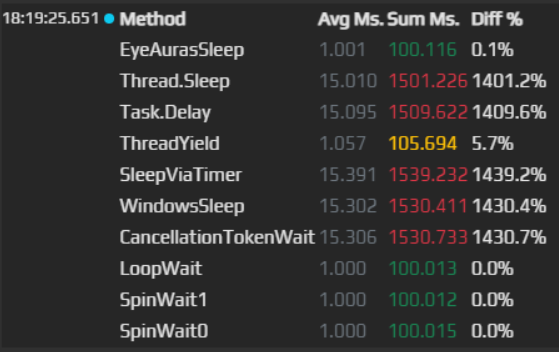
Practical rule:
- in
Script.csx, writeSleep(...) - do not use
Thread.Sleep(...) - use
Task.Delay(...)only if you specifically need the async model and understand why
¶ Which rewriters EyeAuras applies to Script.csx
EyeAuras applies code rewriters to Script.csx. This is another reason why it is important to separate script code from regular classes.
In practice, at minimum, it helps to remember this:
- EyeAuras tries to protect infinite loops like
while (true)by adding acancellationTokencheck Thread.Sleep(...)in script code is replaced withSleep(...)- some calls that can accept a
CancellationTokenmay be automatically adjusted by the runtime
This is a useful safety net, but not a reason to write sloppy code. The best practice is still:
- write
while (!cancellationToken.IsCancellationRequested)yourself - write
Sleep(...)yourself - do not rely fully on rewriter “magic”
¶ What are Anchors, ExecutionAnchors, and disposable resources for
In EyeAuras, it helps to think not only “what object did I create,” but also “when should it die.”
If an object needs proper cleanup later, it is usually attached to a CompositeDisposable. Official reference: CompositeDisposable.
The important lifecycle levels are:
Anchorsare the anchors of the sandbox or object. If you add a resource there, it lives as long as that sandbox or object livesExecutionAnchorsare the anchors of the current script run. Stopping and starting the script recreates them- a local
CompositeDisposableis useful inside your helper classes when you want to group resources into one cleanup “bundle”
Short rule:
- if a resource should die when the current run stops, add it to
ExecutionAnchors - if the resource should live longer, until the script or helper itself is unloaded, use
Anchors
Example:
var overlay = GetService<IImGuiExperimentalApi>()
    .AddTo(ExecutionAnchors);
That means the overlay only lives for the current script run.
Examples:
¶ What is IScriptingApiContext
IScriptingApiContext is an internal script context object. It contains:
- the Roslyn
Solutionof the current script - the DI container bound to that context
- the workspace version
Anchorsfor resources in that context
Normally, a regular script author does not need to create IScriptingApiContext manually. But the general idea is useful to understand:
- a sandbox can be associated with multiple contexts
- services can be resolved not only from the “main” container
- the context itself has its own lifecycle and its own
Anchors
This becomes especially important if you build your own libraries, extensions, or move code from one file into a larger structure.
¶ When exactly to use ExecutionAnchors
If your script creates resources that should die with the current script run, attach them to ExecutionAnchors.
Typical examples:
- overlays
- renderers
- temporary subscriptions
- helpers that should not survive stop/start
The idea is simple: if the resource belongs specifically to the current execution of the script, tie it to the lifetime of that execution.
Examples:
¶ What kinds of variables exist
In practice, it helps to think in three levels:
- local C# variables inside a method
- sandbox properties: they live until the script is recompiled
- script/aura/folder variables: external storage visible in the UI and accessible to other scripts
For most scenarios, the best API is ScriptVariable<T> via Variables.Get<T>(...).
var attempts = Variables.Get<int>("attempts");
attempts.Value++;
Advantages of this approach:
- more type-safe than working through
object - easier to read and write
- easy to share state between scripts
Read more: Variables, IVariablesScriptingApi
Examples:
¶ Auras and accessing them from scripts
A script usually has access to the current aura and current folder:
AuraTree.AuraAuraTree.Folder
You can also find other items by path:
FindAuraByPath(...)/GetAuraByPath(...)FindFolderByPath(...)/GetFolderByPath(...)GetTriggerByPath<T>(...)
Useful rule:
- use
Find*when it is normal for the object to be missing - use
Get*when a missing object is an error
Important: auras also have their own variables. So you can store data not only at the current script level, but also at the aura or folder level.
var aura = AuraTree.GetAuraByPath(@".\Gameplay\Boss");
var phase = Variables.Get<string>(aura, "phase");
Read more: IAuraTreeScriptingApi, IAuraAccessor, How to find an aura
Examples:
¶ What is AddNewExtension<T>(), and when do you need it
Some EyeAuras features are packaged as separate container extensions. This is how you connect a new set of services to the DI container.
For example, some libraries expect explicit activation directly from Script.csx:
AddNewExtension<ImGuiContainerExtensions>();
var imgui = GetService<IImGuiExperimentalApi>();
AddNewExtension<FridaContainerExtensions>();
var frida = GetService<IFridaExperimentalApi>();
This is especially useful for modular packages that you do not want enabled all the time.
Read more: Script Container Extensions, ImGui getting started
Examples:
¶ When to use NuGet packages
If a library already exists as a NuGet package, that is usually the best option.
Why:
- easier to connect and update
- better portability
- works better with export/import and IDE workflows
- in newer
packrevisions, EyeAuras preloads NuGet dependencies and includes them in the pack
Basic syntax:
#r "nuget: Some.Package, 1.2.3"
Minimal example:
#r "nuget: Newtonsoft.Json, 13.0.3"

using Newtonsoft.Json;

Log.Info(JsonConvert.SerializeObject(new { Hello = "World" }));
Important: #r directives must be written in Script.csx. They do not work in regular related *.cs classes.
Read more: NuGet and assemblies, NuGet packaging inside packs
¶ When to use local assemblies
Local assemblies are useful when:
- there is no NuGet package
- the library is internal or private
- you want to place the DLL next to the script as part of the project
The best portable option is usually:
- add the DLL to the script files as an embedded resource
- reference it via
#r "assemblyPath: MyLib.dll"
Minimal example:
#r "assemblyPath: MyLib.dll"

using MyLib;

var helper = new SomeLibraryHelper();
Log.Info(helper.ToString());
This is much better than an absolute path like D:\\Work\\Something\\MyLib.dll, because that path only works on the author’s machine.
Use absolute paths mostly for local experiments and debugging. For portable solutions, prefer:
- NuGet
- embedded resources
Read more: Embedded resources, NuGet and assemblies
¶ What is a pack, and what happens to dependencies during packaging
A pack is a portable version of your EyeAuras-based solution. It usually includes:
- a compatible version of the program
- config
- auras, scripts, macros, behavior trees
- related resources
What matters for scripts:
- in newer pack revisions, NuGet packages are preloaded and included in the pack
- project resources are also included in the pack
- if you want a portable solution, do not depend on absolute paths on a local disk
If a script will run anywhere other than your own machine, a good base rule is:
NuGet > embedded DLL > absolute DLL path
Read more: Packs, NuGet packaging inside packs, resources in packs
¶ What is a mini-app
A mini-app is no longer just “a script inside EyeAuras,” but your own product built on top of EyeAuras.
Short version:
- regular script or pack: the user still interacts a lot with the EyeAuras UI
- mini-app: the user mostly works with your UI and your logic
A mini-app is a good fit when you want to:
- build your own interface
- create a tool, helper, launcher, bot, or utility
- control UX more tightly
- later add licensing, KeyLogin, and other product-level features
¶ Can a script grow into a full application
Yes. That is one of the main strengths of the whole system.
A typical growth path looks like this:
- quick
.csxorC# Action - export to
.sln - development in Rider / Visual Studio
Import/Live Import- publish as a
pack - move to a
mini-appif needed
So an EyeAuras script is not a dead-end “embedded macro.” It is a normal entry point into a larger project.
Read more: IDE integration, Mini-app
¶ What about licensing
If you are building your own product on top of EyeAuras, there are several related topics:
- packs for distribution
- sublicenses for paid access to your pack or mini-app
- key login for fast user sign-in by key
- script protection if you need to hide implementation details
For ordinary local scripts, you may not need to think about this at all. For commercial or private solutions, it becomes an important part of the architecture.
¶ Practical recommendations
¶ Start with built-in EyeAuras mechanisms, then add code where needed
If a task can be assembled cleanly using ready-made triggers, auras, variables, and actions, that is usually the best place to start. Scripts work especially well as “smart glue” between existing platform pieces.
It is usually simpler and more reliable to:
- take an existing trigger
- get its result through
AuraTree - add custom logic on top of it
Instead of writing the entire mechanic manually from scratch.
¶ Prefer explicit cancellation-aware logic
Even though EyeAuras can automatically help in some places, explicit code is usually better:
- easier to read
- easier to maintain
- easier for both humans and AI to modify without mistakes
Good baseline patterns:
cancellationToken.WaitHandle.WaitOne();while (!cancellationToken.IsCancellationRequested) { ... }
¶ Use sandbox features in Script.csx, and write normal C# in related classes
This rule is simple, but very useful.
In Script.csx, it is perfectly normal to write:
Log.Info(...)Sleep(...)GetService<T>()AuraTree.Get...(...)
But in helper classes, it is better to either:
- accept dependencies through the constructor
- or create the helper itself through
GetService<T>(), so the container can assemble the dependencies for you
¶ Do not make portable scripts depend on the author’s local paths
If other people will run the solution later, avoid:
D:\\...- links to local resource folders
- DLLs stored “somewhere on your computer”
For portable solutions, it is almost always better to use:
#r "nuget: ..."- embedded resources
- pack
¶ Prefer the stable input API
In older examples and documentation, you may still see ISendInputUnstableScriptingApi, but for new code you should prefer ISendInputScriptingApi.
The old API is mainly useful to know about because you may still encounter it in legacy scripts.
Unstable in an API name usually does not mean “broken” or “dangerous.” It usually only means the interface may still change between versions. If a stable equivalent already exists, prefer it. If the functionality you need only exists in Unstable for now, using it is fine—just be aware of possible breaking changes when updating.
Examples using the newer API:
¶ Prefer Variables.Get<T>() for variables
You can work through the string indexer, but typed access via ScriptVariable<T> is usually much cleaner and safer.
¶ Use Find* for optional objects, Get* for required ones
This simple rule greatly reduces accidental crashes and makes the code’s intent much clearer.
¶ If the script creates per-run resources, attach them to ExecutionAnchors
This is especially important for:
- renderers
- overlay objects
- temporary subscriptions
That way stop/start behaves predictably and the script leaves less garbage behind.
Examples:
¶ Do not forget AddNewExtension<T>() for libraries that require separate registration
If a package explicitly tells you to call AddNewExtension<T>(), that is not just a using. It is real registration of a new set of services in the container.
Typical example:
AddNewExtension<ImGuiContainerExtensions>();
var imgui = GetService<IImGuiExperimentalApi>();
Without registration, the service may simply never appear in the container.
Examples:
¶ When the script gets large, move to a .sln
If the code has grown big, do not try to keep everything in one file forever.
A good time to switch is when:
- you already have several classes
- you need proper code search
- you want to write tests
- you now have resources, Razor, multiple projects, or many dependencies
That is exactly what Export / Import / Live Import is for.
For app-like script projects with a bot loop, custom script runtime, ImGui root
UI, Blazor tool windows, profiles, and buffered config saves, use the
ImGui memory bot recipe.
One practical detail: Export clears the target folder before exporting the project, so do not export into a directory that contains important files.
If you regularly write or maintain large scripts, it is highly recommended to work in a setup like IDE + AI + EyeAuras MCP. My personal choice right now is Rider + AI Assistant/Codex + EyeAuras MCP, but Visual Studio and VS Code are also perfectly workable options.
Read more: IDE, AI, and MCP integration
¶ Common tasks
¶ How to find an image on screen
For most tasks, the simplest and most reliable approach is to use a configured Image Search trigger and read its result from the script.
var trigger = AuraTree.GetTriggerByPath<IImageSearchTrigger>(@".\ImageSearch");
var result = trigger.Refresh();

if (!result.Detected.Success)
{
    Log.Warn("Image not found");
    return;
}

var screenRect = result.ToScreen(result.Detected.Bounds.Value);
Log.Info($"Image found @ {screenRect}");
Read more: How to find an image
See also:
¶ How to press a button or send a key
For that, you usually need ISendInputScriptingApi:
var input = GetService<ISendInputScriptingApi>();
input.KeyPress(Key.F);
input.MouseLeftClick();
Depending on the task, you can use:
KeyPress(...)KeyDown(...)/KeyUp(...)MouseMoveTo(...)MouseLeftClick()/MouseRightClick()
Read more: ISendInputScriptingApi
Examples:
¶ How to click a found image or word
The general pattern is almost always the same:
- get the bounds of the detected object
- convert them to screen coordinates
- take the center
- move the mouse and click
var input = GetService<ISendInputScriptingApi>();
var trigger = AuraTree.GetTriggerByPath<IImageSearchTrigger>(@".\ImageSearch");
var result = trigger.Refresh();

if (!result.Detected.Success)
{
    return;
}

var screenRect = result.ToScreen(result.Detected.Bounds.Value);
input.MouseMoveTo(screenRect.Center());
input.MouseLeftClick();
For text, the logic is the same, just with Text Search as the data source.
Read more: How to click recognized text
See also:
¶ How to work with coordinates
This is one of the most common sources of mistakes.
In EyeAuras, you usually deal with three kinds of coordinates:
- local viewport / capture window coordinates
- window-relative coordinates
- screen coordinates
The safe rule is simple:
- if the data came from an image/text/color trigger, do not rush to click using it directly
- first make sure which coordinate system you are in
- if you have a raw result, convert coordinates through
ToScreen(...)orToScreenPoint(...)
Most useful methods:
ToScreen(rect)ToScreenPoint(rect)Center()
Read more: WindowImageProcessedEventArgs
Examples:
¶ How to use embedded resources more easily
Embedded resources are useful when you want to ship files together with the script:
- images for Blazor UI
- local markdown or html guides
- json config
- a DLL that is inconvenient to pull in through NuGet
Two of the simplest scenarios:
Show an image in Blazor:
<img src="Images/logo.png" />
Read a text file from the script:
var files = GetService<IScriptFileProvider>();
var helpText = files.ReadAllText("docs/help.md");
Log.Info(helpText);
One small practical detail that often saves time: it is better to write Images/logo.png or docs/help.md, not just logo.png or help.md. Short names are convenient, but if path endings match, it is easy to pick up the wrong file.
If a library already exists on NuGet, it is almost always better to use it through #r "nuget: ...". Embedded resources are especially good for your own files and portable DLLs.
Read more: Embedded resources
Examples: