Memory basics
Practical basics of reading and writing memory through the Memory API in EyeAuras C# scripts
Memory basics for the Memory API
This page covers the fundamentals you actually need in practice: how to read and write memory, what static pointers, pointer chains, and offsets are, how to work with strings and buffers, and which read path to use in C#.
In short, there are only three core ideas here:
- there is an address in memory
- that address contains either the value itself or a pointer to somewhere else
- your C# struct must match how the data is actually laid out in memory
If you want some extra background, these are very useful:
Getting started
Most of the time, you open a process and work through process.Memory:
using System.Diagnostics;
using EyeAuras.Memory;

using var process = LocalProcess.ByProcessId(Process.GetCurrentProcess().Id);

var hp = process.Memory.Read<int>(someHpAddress);
var speed = process.Memory.Read<float>(someSpeedAddress);

process.Memory.Write(someFlagAddress, 1);
In EyeAuras, process.Memory is the main layer for working with memory. You use it to:
- read numbers and structs
- read raw bytes
- write values back
- follow pointer chains
Reading and writing simple values
For simple cases, these are the methods you will use most often:
Read<T>(address)— read a single valueRead<T>(address, count)— read an array of valuesWrite(address, value)— write a single valueWrite(address, spanOrArray)— write a block of valuesRead(address, size)— read raw bytes
var hp = process.Memory.Read<int>(hpAddress);
var positionX = process.Memory.Read<float>(positionAddress);

var header = process.Memory.Read(someAddress, 64);

process.Memory.Write(someAddress, 123);
process.Memory.Write(someAddress + 4, new byte[] { 0x90, 0x90, 0x90, 0x90 });
This path is best for:
int,float,long,bytebool, if you know its actual size in memory- simple
structtypes made of numbers, pointers, and other equally simplestructtypes
If your struct already contains a string, a normal byte[], or something similar, you should usually use ReadManaged<T>(...) instead. There is a separate section about that below.
Static pointers, offsets, and pointer chains
What a static pointer is
A static pointer is an address you can reliably reconstruct from something more stable than “just a number from Cheat Engine”. Usually that means one of these:
BaseAddress + RVA- a module export
- the address of a global object inside a specific module
Simple example:
var mainModule = process.GetProcessModule("game.exe");
var playerManagerPtrAddress = new IntPtr(mainModule.BaseAddress.ToInt64() + 0x123456);
var playerManager = process.Memory.ReadPointer(playerManagerPtrAddress);
The idea is that the module base can change between launches, but the RVA inside that module stays the same. So in practice, we usually think like this:
- “I need address
0x12345678”
but rather like this:
- “I need
game.exe + 0x123456”
What an offset is
An offset is a displacement inside a structure or object.
If you have:
- a player base address
playerBase 0x10toHealth0x18toMana
then the read looks like this:
var health = process.Memory.Read<int>(playerBase + 0x10);
var mana = process.Memory.Read<int>(playerBase + 0x18);
What a pointer chain is
A pointer chain is when an address does not contain the final value, but a pointer to the next object.
In simple terms:
- address A leads to object B
- inside B, an offset contains address C
- inside C, the value you want is stored
Typical flow:
- read a pointer
- add an offset
- read another pointer
- at the end, read the actual value
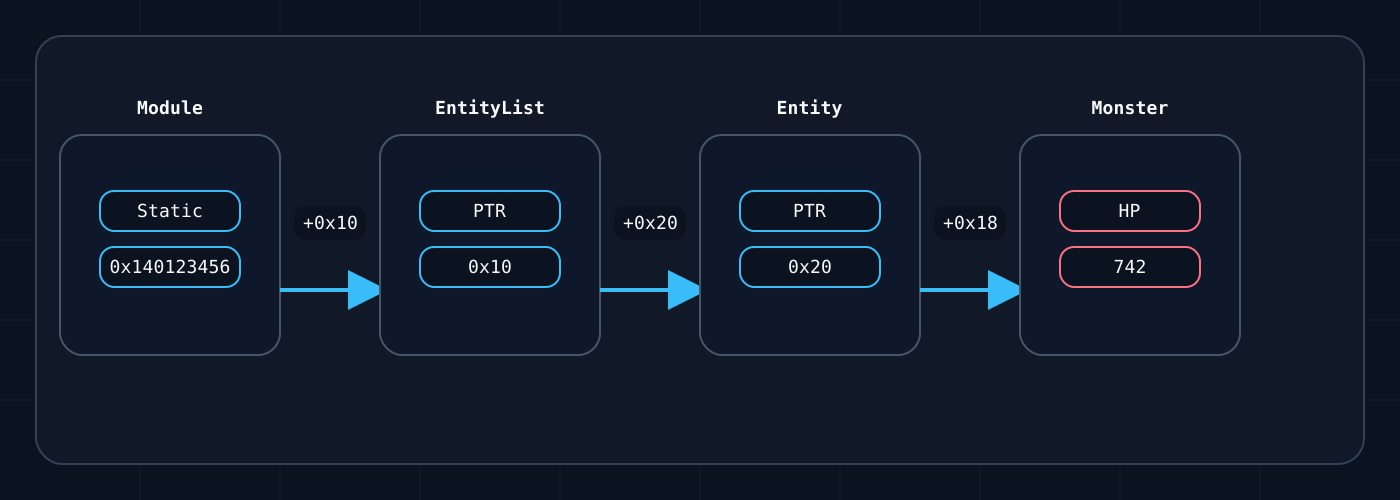
In code, that idea looks like this:
var hp = process.Memory.ReadPointerChain<int>(
    (IntPtr)0x140123456,
    0x10,
    0x20,
    0x18);
The address and offsets here are just examples. The point is not the exact numbers, but that each step either reads a pointer or, at the very end, reads the final normal value.
EyeAuras has built-in helpers for this:
ReadPointer(...)ReadPointer32(...)ReadPointerChain<T>(...)ReadPointerChain32<T>(...)
var health = process.Memory.ReadPointerChain<int>(
    playerManagerPtrAddress,
    0x10,
    0x20,
    0x18);
For a 32-bit layout, use ReadPointer32(...) and ReadPointerChain32<T>(...), otherwise you will simply read pointers with the wrong size.
Important: if the chain hits null, ReadPointerChain<T>(...) returns default instead of throwing an exception. That is convenient, but it can also hide logic errors, so in more complex cases it is useful to log intermediate addresses separately.
Strings and encodings
The Memory API has three main helpers here:
ReadString(...)—UTF-8ReadStringA(...)— single-byteASCII/ ANSI-style stringReadStringU(...)—UTF-16 LE(Encoding.Unicode)
var utf8Name = process.Memory.ReadString(namePtr.ToInt64(), 64);
var ansiName = process.Memory.ReadStringA(namePtr.ToInt64(), 64);
var wideName = process.Memory.ReadStringU(namePtr.ToInt64(), 64);
Practical rules:
- the length parameter in
ReadStringU(...)is in bytes, not characters - strings are trimmed at
\0by default - if the encoding in memory is different, you will get garbage even if the address is correct
WriteString(...)currently writes aUTF-8string with a trailing\0
If the string is not stored separately but as a fixed field inside a struct, it is almost always better to read it through ReadManaged<T>(...). There is a separate page for that: C# Struct Layout.
Useful background on strings and marshaling:
Endianness
In normal Windows processes, this is usually simple: x86 and x64 are little-endian.
That means these bytes:
01 00 00 00
represent int = 1, not 16777216.
For normal memory reading on Windows, you almost never need to reverse bytes manually. In practice, for a typical Windows game, you can usually just remember that and move on.
But if you are:
- reading a dump from a different architecture
- working with your own backend
- parsing network or file structures that use big-endian
then endianness becomes something you need to handle explicitly.
using System.Buffers.Binary;

var raw = process.Memory.Read(someAddress, 4);
var bigEndianValue = BinaryPrimitives.ReadInt32BigEndian(raw);
Useful reference:
Buffers and performance
The most common mistake in memory scripts is reading too many tiny pieces one field at a time.
Bad approach:
- 30 separate
Read<int>(...)calls every tick
Usually, this is better:
- read one memory block
- parse it locally afterward
var buffer = new byte[0x400];

if (process.Memory.TryRead(playerBase, buffer.AsSpan()))
{
    var health = BitConverter.ToInt32(buffer, 0x10);
    var mana = BitConverter.ToInt32(buffer, 0x18);
    var targetId = BitConverter.ToInt64(buffer, 0x28);
}
If you have an array of identical elements, it is often more convenient to read it directly as a struct array:
var actors = process.Memory.Read<ActorEntry>(actorsArrayAddress, actorCount);
Under the hood, MemoryAccessor already does a few useful things:
- uses
stackallocfor small buffers - uses
ArrayPool<byte>for some unmanaged reads - tries to avoid extra temporary arrays where
Span<T>is enough
Even with that, batching still matters. In this kind of work, the biggest performance win is usually not “write smarter C#”, but “reduce the number of actual reads from process memory”.
Multithreading
Multiple readers at the same time are generally fine. EyeAuras tests include both multiple sequential readers and multiple parallel readers.
But it is important to understand the boundary here:
- the API itself can usually handle parallel reads
- the target process may still change its data between your reads
So the problem is usually not that MemoryAccessor itself “breaks under threads”, but that the process data may already have changed by the time you read it.
Practical advice:
- if you need a consistent snapshot, read the whole block at once
- if your backend supports it and the scenario is safe, you can temporarily freeze the process separately
- do not split one logical object into dozens of unrelated reads across different threads without a good reason
Which read path to choose
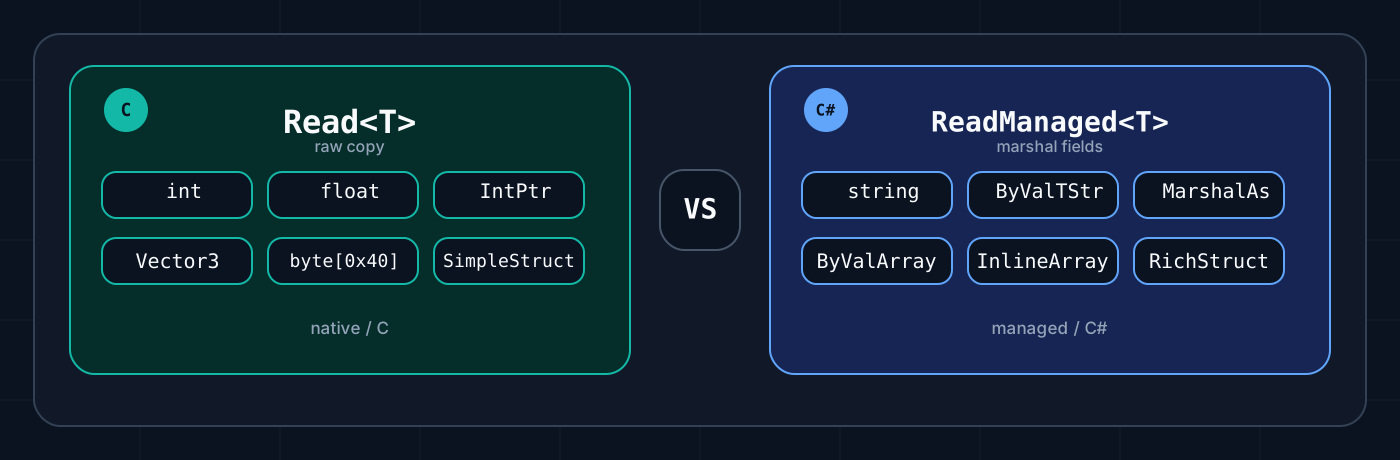
This is one of the most important distinctions in the whole topic. But you do not need to memorize the terms. The practical rule is enough.
Option 1 - the fast path
This includes:
Read<T>(...)TryRead<T>(...)Read<T>(..., count)Write<T>(...)
Use this if the structure is simple. For example, it contains only:
- numbers
- pointers
fixedInlineArray- other equally simple structures
And this path is not suitable if it already contains:
string- a normal
byte[] - other reference-type fields
This is the fastest path.
Option 2 - the flexible path
This includes:
ReadManaged<T>(...)TryReadManaged<T>(...)TryWriteManaged<T>(...)
Use this when the structure is already more “C#-style”. For example, when it contains:
[MarshalAs(UnmanagedType.ByValArray, ...)][MarshalAs(UnmanagedType.ByValTStr, ...)]- fixed string fields
- a layout that is easier to describe through marshaling
This path is much more flexible, but slower.
Short rule:
- if the structure is simple, use regular
Read<T>(...) - if it contains strings,
MarshalAs, or a more complex layout, useReadManaged<T>(...)
If you are not sure:
- first try to describe the structure as a simple one
- if you run into strings or fixed managed fields, switch to
ReadManaged<T>(...)