Pattern Scanning
Which signature types EyeAuras supports and how to scan memory patterns
Pattern Scanning in the Memory API
Pattern scanning is useful when you cannot rely on a fixed address because of updates, ASLR, or changing memory layouts. Instead of “read from 0x12345678”, you search for a stable byte sequence near the place you need. For background, a good starting point is Dynamic Memory Allocation and Pattern Scanner.
Where to start
In most cases, you should scan the memory of a specific module instead of the entire process:
using System.Diagnostics;
using EyeAuras.Memory;
using EyeAuras.Memory.Scaffolding;

using var process = LocalProcess.ByProcessId(Process.GetCurrentProcess().Id);
using var memory = process.MemoryOfModule("kernel32.dll");
This is both faster and easier to reason about, because the resulting offset is immediately tied to that module.
Supported signature formats
Everything is built around BytePattern. Out of the box, it supports:
- exact byte sequences
- hex strings
- wildcards with
?and?? - C-style syntax like
\xAA\xBB - byte arrays with a separate mask
- the
^marker, which marks the point of interest inside the match
var exact = BytePattern.FromPattern(new byte[] { 0x48, 0x85, 0xC0, 0x74, 0x0A });
var hex = BytePattern.FromTemplate("48 85 C0 74 0A");
var wildcards = BytePattern.FromTemplate("48 85 ?? 74 0A");
var cStyle = BytePattern.FromTemplate(@"\x48\x85\xC0\x74\x0A");
var masked = BytePattern.FromMaskedPattern(new byte[] { 0x48, 0x85, 0xC0, 0x74, 0x0A }, "xxxxx");
var withOffset = BytePattern.FromTemplate("48 ^ 85 C0 74 0A");
In the examples below, we use the same pattern 48 85 C0 74 0A throughout so it is easier to connect the diagram, code, and search result.
The ^ marker is especially useful when you do not need the start of the match, but a specific byte inside the instruction. For example, 48 ^ 85 C0 74 0A returns the offset of 85, not the first byte 48.
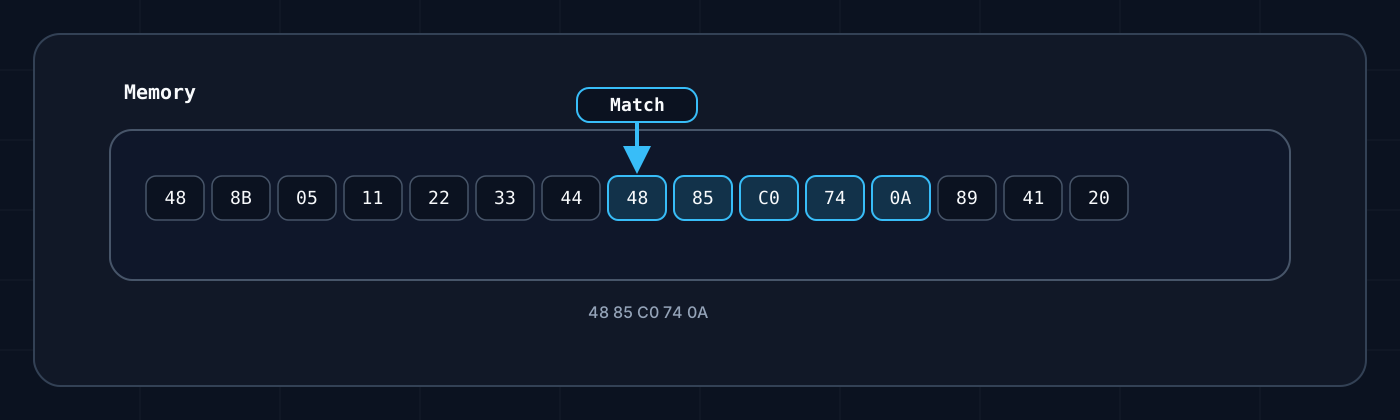
Quick breakdown of the diagram:
- The
Memoryblock contains a normal sequence of bytes. - The highlighted fragment
48 85 C0 74 0Ais the matched pattern. - The arrow shows the start of the match. That point is what the returned
offsetusually refers to. - From there, you decide what to do next: use the instruction as an anchor, add an offset, or follow a pointer chain to the final address.
How to search
Main methods:
FindOffset(...)— returns the offset or-1GetOffset(...)— returns the offset or throws an exceptionFindOffsets(...)andGetOffsets(...)— the same idea for multiple signatures
var pattern = BytePattern.FromTemplate("48 85 C0 74 0A");
var offset = memory.FindOffset(pattern);

if (offset >= 0)
{
    var va = memory.BaseAddress + offset;
    Log.Info($"Found at 0x{offset:X}, VA={va.ToHexadecimal()}");
}
Offset vs address
offsetis the position inside the currentIMemoryVAis the absolute virtual address in the process
If you search inside MemoryOfModule(...), the absolute address is usually calculated as memory.BaseAddress + offset.
Using the diagram above as an example, FindOffset(BytePattern.FromTemplate("48 85 C0 74 0A")) returns the offset of the first highlighted byte, 48.
When to use Find* and Get*
- Use
Find*when a missing signature is an expected scenario. - Use
Get*when a missing signature already means an incompatible client version or an error.
Practical tips
- Scan a module, not the whole process, if you know which
.exeor.dllyou need. - Do not make the signature too short.
- Hide unstable bytes behind wildcards.
- If you need a point inside an instruction, use
^instead of doing extra manual offset math. - In game-related scenarios like an
entity listorview matrix, the signature is usually just an anchor point. After that, you still read pointers and structures.