1.9.9406
April update — Discord bot public alpha and AI/docs improvements
New UI Enabled by Default
The new interface has been in alpha for several weeks now, and at this point it looks like the most critical issues have either already been fixed or simply haven’t shown up yet.
For all new users, IsBlazorMode = true is now enabled by default. In other words, new installations start with the new UI right away.
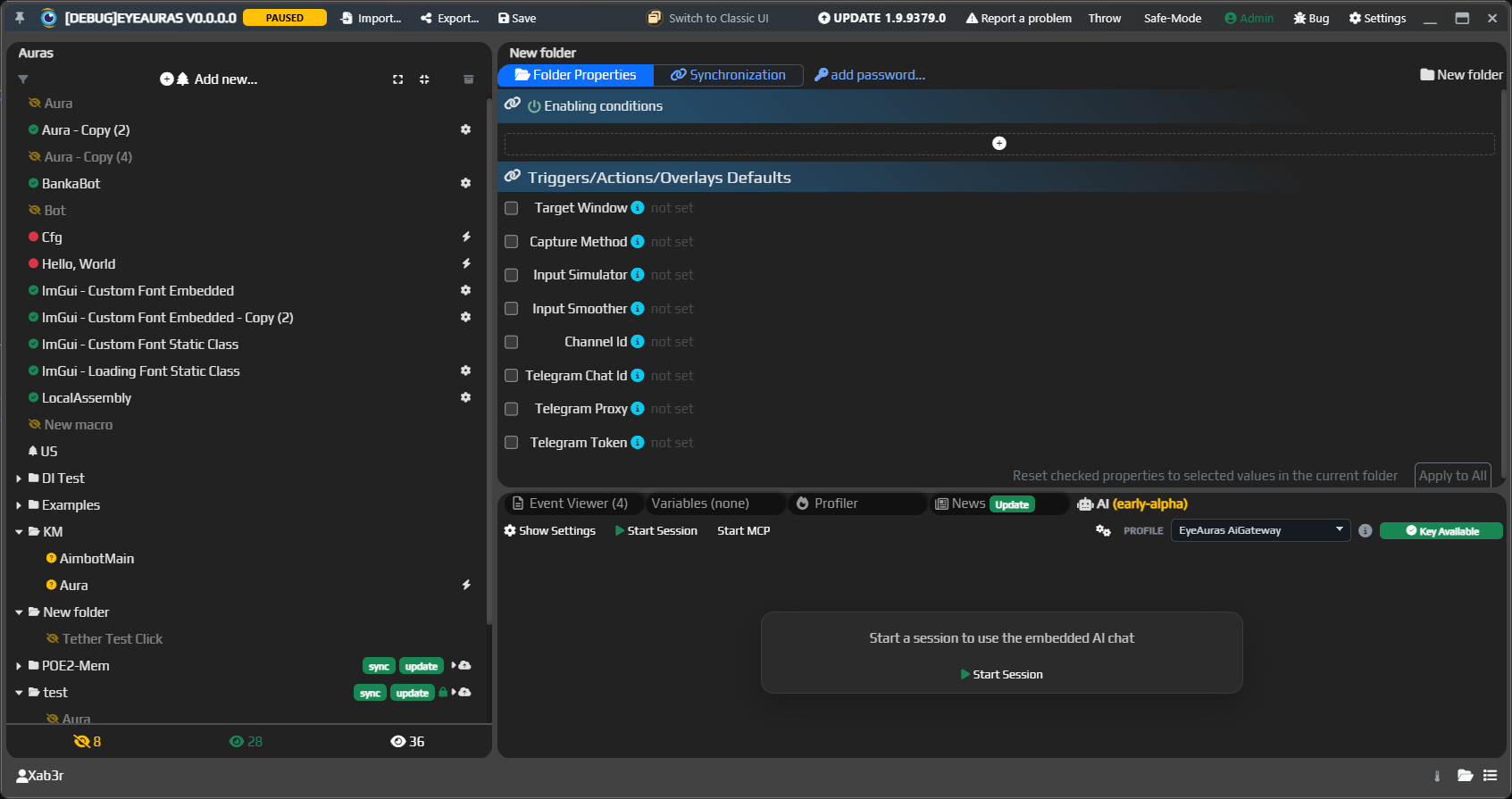
If you are still using the classic shell, I highly recommend at least trying the new interface. It was first introduced here:
Discord Bot
We are launching the public alpha of EyeAuras Bot.
This is a bot that lives in Discord, and you can already message it for help with EyeAuras. It knows the documentation and can help with scripts, settings, and common usage scenarios.
The main usage flow is:
- in DMs, you can talk to it like a regular personal assistant
- in public channels, you need to explicitly mention it (
@EyeAuras), and the bot will try to join the conversation and answer your question(s). That said, DM is still the better option, and if you do mention it in a channel, it is best to ask the question explicitly — it is simply more reliable that way - if the bot acts dumb, please DM me about it
Built-in AI Assistant
The built-in AI Assistant inside the app should also be getting smarter.
It now understands EyeAuras-specific details better, gives more useful answers about code and scripts, and in general depends much more on the quality of the local wiki. The better and more complete the documentation is, the smarter the built-in AI becomes.
We also added separate documentation for scripting best practices:
EyeAuras Gateway
EyeAuras Gateway is also evolving. It is essentially a proxy server on top of OpenAI and is meant to solve two simple problems:
- provide an easier entry point for AI inside EyeAuras, so users do not have to go to OpenAI, sign up there, create a key, and so on
- simplify access where direct OpenAI usage is inconvenient, especially from Russia
At the current stage, it is a convenient way to try AI through EyeAuras infrastructure without registration and SMS (c).
P.S. that is not entirely true — you do still need an EyeAuras account, but you do not need to pay anything.
Anyone can join testing: if you want access to the current alpha, just message Xab3r in Discord DM.
What matters here:
- work is in progress on free usage limits for all app users, split into 5 hours, 1 week, and 1 month. In other words, you will have some free allowance that should ideally be enough for questions, clarifications, and similar tasks. It most likely will not be enough for full-scale coding — AI is simply expensive, and the app itself is free right now. You will be able to top up the limit through the website, but honestly, for that use case I would suggest just signing up for OpenAI and paying for a subscription there
- the option to specify a regular OpenAI endpoint and use your own key is not going anywhere
Read more about EyeAuras Gateway
C# Scripting - ScriptContainerExtensions
At the same time, the technical documentation for C# scripting is also being expanded.
A separate article has been added for ScriptContainerExtensions. This is the mechanism that lets you register your own services in the script DI container, connect modular libraries, and build larger scripting scenarios, mini-apps, and packs in a cleaner way.
In short, this is an important topic for anyone who has already outgrown a single Script.csx and wants to build a more modular architecture on top of EyeAuras.
Wiki and Automatic Translation
The entire wiki is now available in both Russian and English.
The translation is done automatically through AI, so if something looks awkward or the meaning gets distorted in the English version, please let us know:
Fixes and Improvements
- [Discord Bot] Added basic usage limits and admin DM slash commands to control load:
/limit-usageand/configured-limits - [Discord Bot] The
stopbutton no longer lets any channel participant stop someone else’s request - [Discord Bot] Message edits and deletions are now reflected more accurately in the bot’s memory and history, reducing stale context
- [Discord Bot] Bot replies and service messages are now sent without accidental
@everyone, role, or user pings - [Discord Bot] Long markdown replies and code are now split into Discord messages more cleanly; artifacts can now be sent as files
- [Discord Bot] The system prompt and documentation handling were tuned so the bot can answer better about changelogs, scripting, and the wiki
- [AI] Improved the
Responses API: added streaming responses - [AI/UI] Improved the AI chat view: better reasoning display, plus improvements to the
Tool Calls,Reasoning, andTelemetrytoggles - [AI/UI] AI settings were moved into a separate
Show Settingswindow - [UI] For new users, the new interface is now enabled by default (
IsBlazorMode = true) - [MCP] MCP in desktop AI is no longer hidden behind alpha access