Show a reminder while your checklist contains TODO
Read a small checklist saved as UTF-8 and keep a reminder visible until its TODO marker is removed.
Keep unfinished checklist items visible
Show Finish the checklist while your own text file contains TODO. Saving the file without that marker hides the reminder. The file supplies the condition; Text contains the separate message you want to see.
Use a small local UTF-8 file that EyeAuras can read. In your own writable folder, save checklist.txt with two lines: TODO review notes and DONE choose filename. Remember its full path. This recipe does not read an unsaved editor buffer or follow a file to a new name.
Read the saved checklist
-
Right-click an empty part of the EyeAuras tree, choose New Aura, and name it Checklist warning. In Triggers, click + and add File Contains Text.
-
In File path, enter your file's complete path or select it with .... Check File contents: it must show both saved lines, including TODO. There is no need to invent a capture window or an OCR language for a local text file.
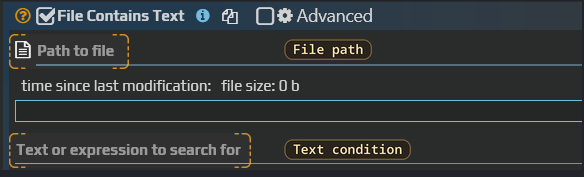
The earlier editor labels the upper field Path to file. Enter the path to your saved checklist, then set the condition in the lower field.
-
In the text evaluator, choose Regex, enter
TODOwithout quotes or outer slashes, and enable Ignore Case. This literal pattern finds that fragment anywhere in the saved contents. Text mode would compare the entire file instead. Keep Test mode off so the real file controls the result. -
In Overlays, click + and add Text. Enter
Finish the checklistin Content and use the settings below. Turn Locked off to place a readable 450 × 80 reminder, then turn it on again. Leave all action lists empty.
| Setting | Value |
|---|---|
| Text → Font | 24 |
| Text → Size to fit | Off |
| Window → Mode | Overlay |
| Position → Locked / Clickthrough | On after placement |
- Keep the aura enabled and EyeAuras unpaused. Select another aura and leave the editor: the reminder should be visible while the saved file contains TODO.
- In your file editor, replace
TODO review noteswithDONE review notesand save. Wait for File contents to reflect the new text. The trigger should become Not Active and the locked reminder should hide. Restore TODO and save to make it appear again.
Updates are read after connecting and on filesystem changes, with nearby events grouped over about 250 ms. That is not an exact post-save deadline. If the reminder does not change, inspect File contents and the configured path before changing the expression. The literal TODO also matches inside a longer word; use \bTODO\b in Regex if your checklist requires a whole-word marker.
A missing path or missing file gives Unknown, not a confirmed clean checklist. An unreadable existing file is also not a successful no-match: inspect access, displayed contents and errors rather than assuming every read failure has the same state. Reads use an encoding marker when present and otherwise UTF-8; this editor has no arbitrary legacy-code-page selector.
File Contains Text supplies the saved snapshot, text matching selects the marker, and Text with common options displays the answer. Its Content is not automatically bound to the file text. An unlocked or selected editing preview may stay visible; judge the condition after locking and leaving that context.