Keep your own reference image beside an editor
Import a local PNG as a static reference card and show it only while your notes editor is active.
Keep a reference card beside your notes
Display your own reference PNG while Notepad is in the foreground. This suits a diagram, checklist or key map that you want to consult without repeatedly opening an image viewer. The imported image is static: it does not track changes in another window.
Prepare a readable PNG you own or have permission to use, such as a 600 × 300 reference card containing your own notes. Save it locally before starting; the Wiki supplies no image. Open one Notepad window and keep other Notepad windows closed for an unambiguous target.
Import, place and lock the card
- Right-click an empty area of the tree, choose New Aura, and name it Reference card.
- In Triggers, click + and add Window Is Active. Set Target Window to
notepadand check that the selected window is your notes editor. - In Overlays, click + and add Image. In its Image section, choose Load image from file... and select your PNG. Check Preview to make sure the intended card loaded. The image is stored as an embedded resource of the configuration, rather than a continuously watched external file.
- Configure the common options below. Temporarily turn Locked off and drag the card beside your notes. With Aspect Ratio enabled, resize it from an edge until all content is readable without distortion. For a 600 × 300 card, a 600 × 300 display area is a useful starting point; shrink it only if the text remains readable.
| Setting | Value |
|---|---|
| Window → Mode | Overlay |
| Visual style → Aspect Ratio | On |
| Position → Locked | On after placement |
| Position → Clickthrough | On |
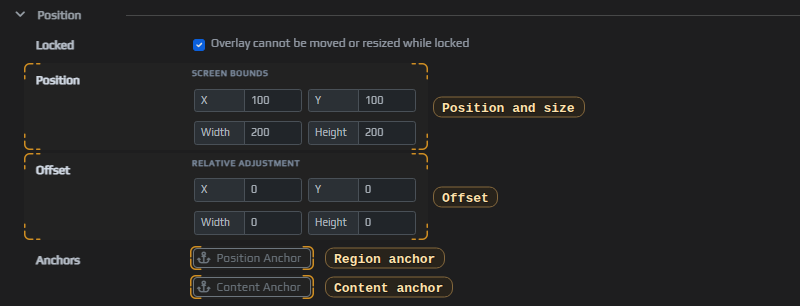
Width and Height size the card on screen. Adjust them for your PNG, then enable Locked.
- Leave the aura enabled and EyeAuras unpaused. Select another aura and return to Notepad: the card should be visible. Switch to a different application: it should disappear. Return to Notepad and confirm the same card appears again.
Window Is Active chooses when the card is needed; Image supplies your imported reference; common overlay options control its size, placement and mouse interaction. An unlocked card or the selected aura's editing preview can stay visible while you configure it. Check ordinary visibility after locking and leaving that editor context.
Editing the original PNG on disk does not automatically replace the embedded copy. Load the revised file again when the card changes. If you need a continuously changing view of another window instead, use the live status crop recipe, which uses Replica rather than a static image.