Play a start cue and a finish cue for one short routine
Run a finite macro with two prepared sounds separated by a fixed 1500 ms wait.
Mark the start and finish of a short routine
Hear Ping, wait 1500 ms after it finishes, then hear Bell. Run this finite routine manually when you want an audible beginning and end. The pause measures elapsed time; Bell does not confirm completion of an operation in another application.
You need EyeAuras with the New Macro editor and Run Aura template available, plus an audible output. Use a separate, sound-only set; no key delivery or programming is involved.
Prepare two callable sound auras
- Right-click an empty area of the aura tree and choose New Aura. Name it Routine start. Add Fixed Value to Triggers, set Is NOT Active, and leave it there so normal activation does not play the cue independently.
- In On Enter, click +, add Play Sound, choose Audio notification → Ping, set Volume 50%, and turn Play in background off. Preview the sound. Leave While Active, On Exit and Overlays empty: the aura must contain exactly one action.
- Create another loaded aura Routine finish in the same way, using Bell instead of Ping and keeping Fixed Value Is NOT Active. It too has exactly one action, with Play in background off. Keep both auras enabled even though their trigger states are inactive.
Put the three steps in a macro
-
In the tree's creation menu choose New Macro and open it. Select the top settings row: enable Activation → Is Loaded, choose Execution → When Activated → Do nothing, and add no automatic activation conditions.
-
In the existing Drag'n'drop instructions here block, use Add new Node to add Run Aura, Wait, then another Run Aura as three siblings in that order. Choose the macro Wait template, not a BT wait in a different tree.
-
In the first Run Aura, open General → Auras → Links, select only Routine start, and confirm that its row shows 1 action, not NO ACTIONS. Choose Strategy → run 1-by-1 in order of addition.
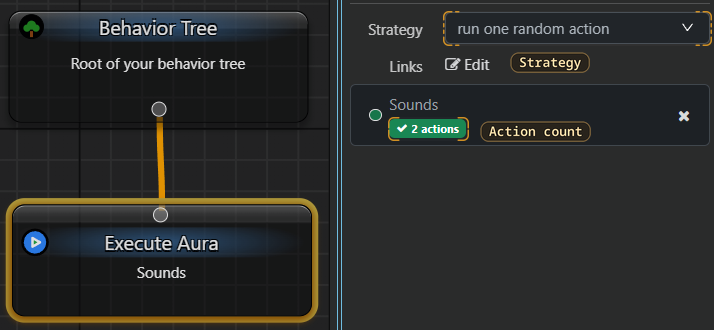
The earlier editor shows one Sounds aura with two actions. In this macro, select one sound aura with one action in each Run Aura.
-
In Wait, set General → Delay to 1500 ms. Turn randomization off with the shuffle button if Min/Max are shown.
-
In the final Run Aura, link only Routine finish, check 1 action, and choose the same ordered strategy. Add no Repeat node or further children.
| Position in the macro Block | Configuration |
|---|---|
| First | Run Aura → Routine start, ordered |
| Second | Macro Wait → Delay 1500 ms, randomization off |
| Third | Run Aura → Routine finish, ordered |
- Leave EyeAuras unpaused and click the upper Run Macro Once. Expect Ping, about 1.5 seconds of silence after Ping ends, then Bell, followed by the macro's completed result. No second tick is needed to finish this macro Wait.
- After completion, leave it idle: there should be no automatic second pair. Click Run Macro Once again only when you want another full routine. To abandon an in-progress manual run, use its Stop control; cancellation is cooperative and cannot undo a sound already played.
Macros order and await the steps. Run Aura invokes the prepared action lists without changing their aura activity; it collects On Enter, While Active and On Exit, which is why the unused lists must be empty here. Play Sound waits for playback because Play in background is off. An ordinary aura can instead put Delay between actions, but this recipe deliberately uses a finite macro.
If a cue is absent, check audio preview, linked aura and action count. An ordinary failed Macro Block child does not necessarily stop later siblings as a BT Sequence would; errors and cancellation have separate behavior. Event Viewer can help inspect reported execution without turning a sound call into proof of external completion.