Web Server with Controllers
Web Server with Controllers
We've already seen how to create a simple web-server, now lets step up the game a bit.
Manually creating routes and parsing arguments yourself is not very convenient. Definitely possible way of doing things, but things tend to become cluttered a bit too fast.
That is why people have introduced MVC, which is one of the ways of structuring your app and making it more readable/supportable
Idea is simple - you describe where and how exactly you expect the data to be sent to you, AspNet parses everything into readable form and invokes your method, with everything prepared and ready-to-be-used. So instead of manually extracting arguments from query string, you just add a method with normal C# types in it.
Steps
Set of steps is quite similar to what we saw earlier, with one important twist - instead of manually building Routes, you create Controller, add Attributes to it and make AspNet create everything for you. All you have to do afterwards is add new methods, if needed.
- Important! You have to point AspNet where your Controllers reside - this is already done in the code
- Controllers MUST be defined in separate files. That is requirement - defining them in
Script.csxwon't work - You can have multiple Controllers with different Routes, Methods and Arguments - AspNet will take care of routing and picking the best method for you
Example
You can import the ready-made example from here: https://eyeauras.net/share/S20250302232729tsMgRqVRO6Gr
- Create an aura with a script
- Copy-paste, run it, there should be a line printed to console
Starting web-server- this tells us that everything went fine - Access the page via CURL or browser
How it could be used?
Same way as it has been used in Simple version. It is just that in structuring things that way you get much more powerful tools in your toolbox - you can have multiple Controllers with their own responsibilities, use Dependency Injection and other high-level things.
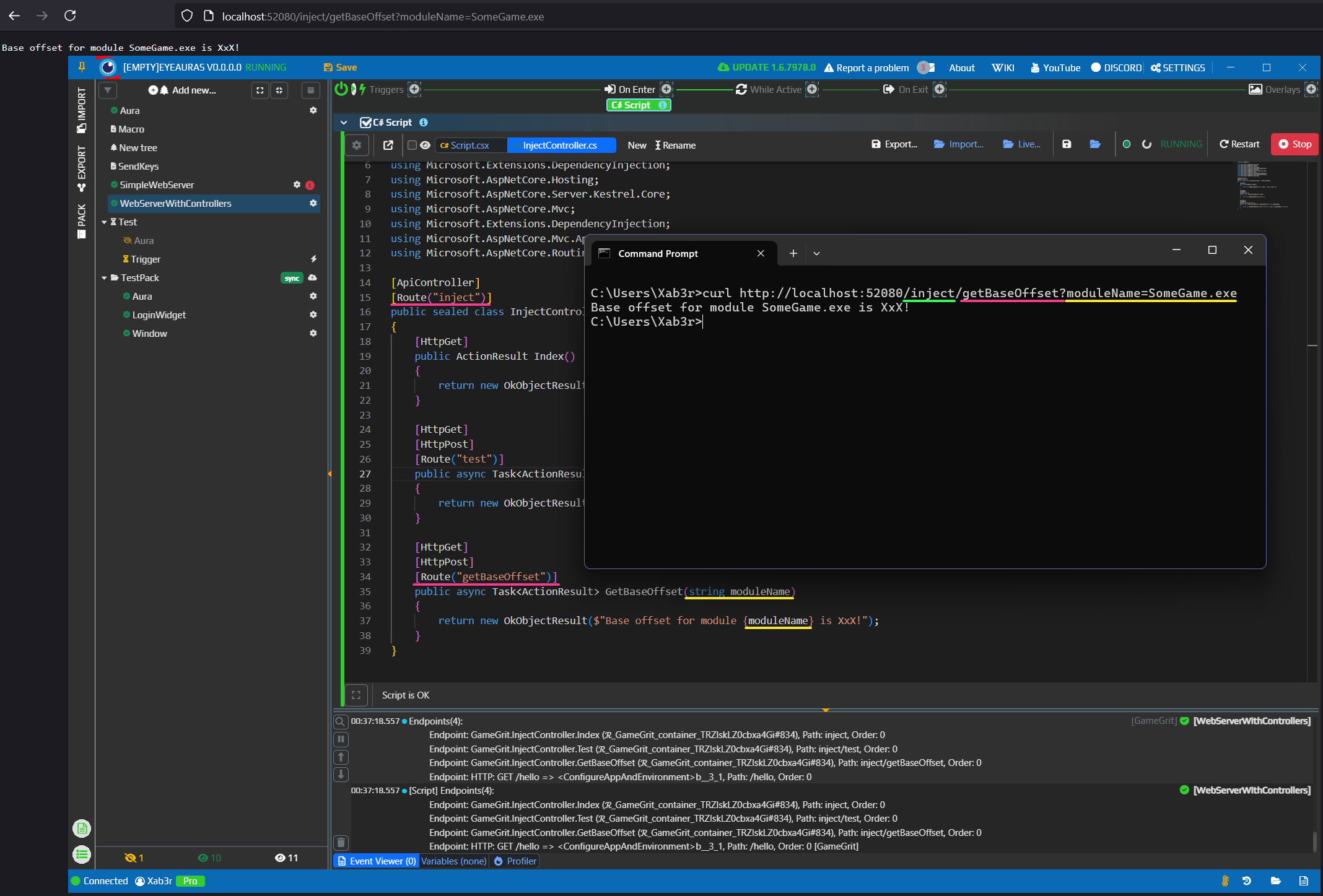
Script.csx
#r "assemblyName: Microsoft.AspNetCore"
#r "assemblyName: Microsoft.AspNetCore.Hosting"
#r "assemblyName: Microsoft.Extensions.Hosting"
#r "assemblyName: Microsoft.AspNetCore.Routing"
#r "assemblyName: Microsoft.AspNetCore.Server.Kestrel.Core"
#r "assemblyName: Microsoft.AspNetCore.Http.Abstractions"
#r "assemblyName: Microsoft.AspNetCore.Hosting.Abstractions"
#r "assemblyName: Microsoft.AspNetCore.Server.Kestrel"
#r "assemblyName: Microsoft.AspNetCore.Mvc.Core"
#r "assemblyName: Microsoft.AspNetCore.Mvc"
#r "assemblyName: Microsoft.Extensions.Configuration.Abstractions"
#r "assemblyName: Microsoft.AspNetCore.Routing.Abstractions"

using GameGrit;
using Microsoft.AspNetCore.Builder;
using Microsoft.AspNetCore.Http;
using Microsoft.Extensions.Hosting;
using Microsoft.Extensions.DependencyInjection;
using Microsoft.AspNetCore.Hosting;
using Microsoft.AspNetCore.Server.Kestrel.Core;
using Microsoft.AspNetCore.Mvc;
using Microsoft.Extensions.DependencyInjection;
using Microsoft.AspNetCore.Mvc.ApplicationParts;
using Microsoft.AspNetCore.Routing;

using System;

const int PortNumber = 52080;

Log.Info("Creating web-app builder");

var host = await Task.Run(() =>
{
    var builder = Host
    .CreateDefaultBuilder()
    .ConfigureAppConfiguration((context, config) =>
    {
        //Very important line!
        //This is required to run the server in EA infrastructure
        config.Sources.Clear();
    })
    .ConfigureWebHostDefaults(webBuilder =>
    {
        Log.Info("Setting up web-options");
        webBuilder
           .ConfigureKestrel(options => ConfigureKestrel(options))
           .Configure((ctx, app) => { ConfigureAppAndEnvironment(Log, app, ctx.HostingEnvironment); });

        webBuilder.ConfigureServices(services => {
            var manager = new ApplicationPartManager();
            services.AddSingleton<ApplicationPartManager>(manager);
            services
                .AddControllers()
                .AddApplicationPart(typeof(InjectController).Assembly); //that line will ensure that Controllers are properly detected
        });
    });

    Log.Info("Building web-server");
    return builder.Build();
}, cancellationToken);

Log.Info("Starting web-server");
await host.RunAsync(cancellationToken);
Log.Info("Terminated");

private static void ConfigureAppAndEnvironment(
    IFluentLog log,
    IApplicationBuilder app,
    IWebHostEnvironment env)
{
    app.UseRouting();
    app.UseEndpoints(endpoints =>
    {
        endpoints.MapControllers(); //will build up routes and make your Controllers available for invocation
        endpoints.MapGet("/hello", () => "Hello World!");
    });

    EnumerateEndpoints(log, app);
}

private static void ConfigureKestrel(KestrelServerOptions serverOptions)
{
    serverOptions.ConfigureEndpointDefaults(endpointOptions => { endpointOptions.Protocols = HttpProtocols.Http1; });
    serverOptions.ListenAnyIP(PortNumber, listenOptions => { listenOptions.Protocols = HttpProtocols.Http1AndHttp2; });
}


private static void EnumerateEndpoints(IFluentLog log, IApplicationBuilder app)
{
    var endpointDataSource = app.ApplicationServices.GetRequiredService<EndpointDataSource>();

    var endpoints = endpointDataSource.Endpoints
        .Select(x => x is RouteEndpoint routeEndpoint ? $"Endpoint: {routeEndpoint.DisplayName}, Path: {routeEndpoint.RoutePattern.RawText}, Order: {routeEndpoint.Order}" : "Unknown endpoint: {x}")
        .ToArray();
    log.Info(endpoints.DumpToNamedTable("Endpoints"));
}
InjectController.cs
namespace GameGrit;

using Microsoft.AspNetCore.Builder;
using Microsoft.AspNetCore.Http;
using Microsoft.Extensions.Hosting;
using Microsoft.Extensions.DependencyInjection;
using Microsoft.AspNetCore.Hosting;
using Microsoft.AspNetCore.Server.Kestrel.Core;
using Microsoft.AspNetCore.Mvc;
using Microsoft.Extensions.DependencyInjection;
using Microsoft.AspNetCore.Mvc.ApplicationParts;
using Microsoft.AspNetCore.Routing;

[ApiController]
[Route("inject")]
public sealed class InjectController : ControllerBase
{
    [HttpGet]
    public ActionResult Index()
    {
        return new OkObjectResult(new { Text = "Index page" });
    }

    [HttpGet]
    [HttpPost]
    [Route("test")]
    public async Task<ActionResult> Test()
    {
        return new OkObjectResult($"Hello!");
    }

    [HttpGet]
    [HttpPost]
    [Route("getBaseOffset")]
    public async Task<ActionResult> GetBaseOffset(string moduleName)
    {
        return new OkObjectResult($"Base offset for module {moduleName} is XxX!");
    }
}=