Using Models in EyeAuras
From an ONNX model to ML Search and Behavior Tree
Using YoloEase in EyeAuras
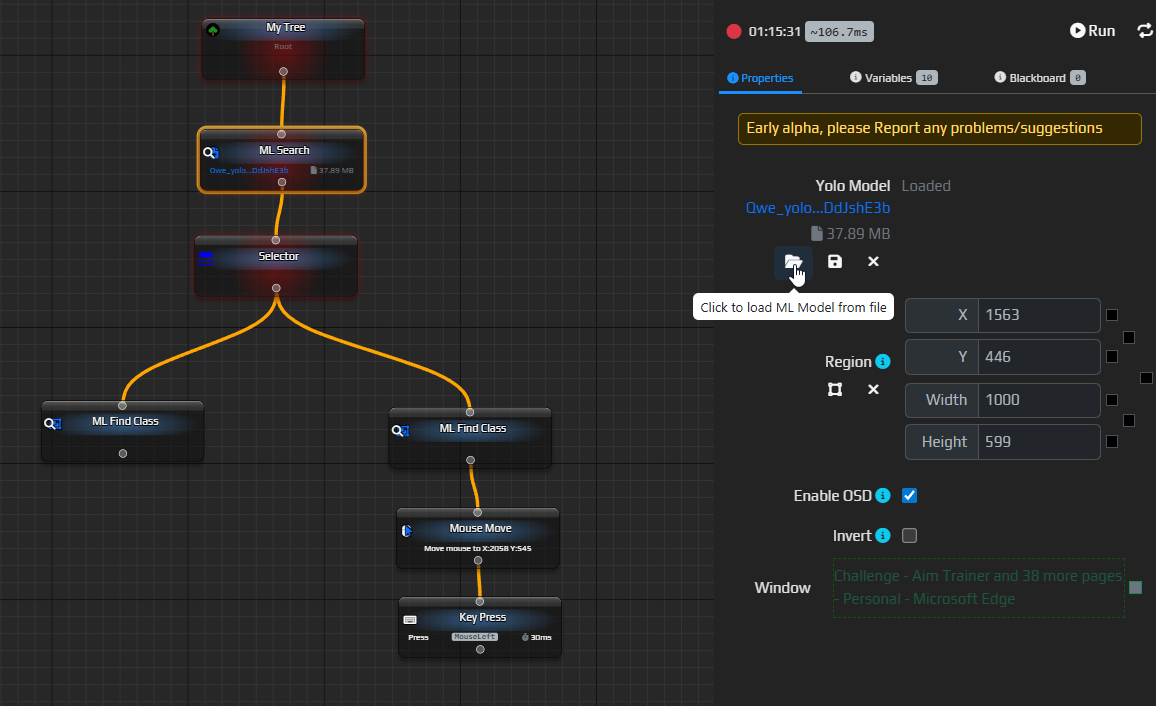
YoloEase prepares the .onnx model. EyeAuras uses it in ML Search, and then the Behavior Tree decides what to do with the detected objects.
Keep the .pt file for training and fine-tuning. For ML Search, use the .onnx file.
For a full walkthrough, see EyeAuras integration.
Quick start
- Open the output folder from Trainer.
- Take the
.onnxmodel. - In EyeAuras, open
ML Search. - Click the model load button and select the
.onnxfile. - Set the capture area so it matches the data used during training.
- If you trained the model on frames with EyeAuras effects enabled, turn on the same effects before detection.
- Enable
Enable OSDand verify the bounding boxes without clicking anything. - Connect
ML Find Class, thenMouse Move, and only addKey Pressafter everything works correctly.