1.6.8211
March - Packs - Features override
Packs - added ability to disable modules from loading
Sometimes, you do not need ALL the functionality which is built into EyeAuras in your Packs. For example, if your pack does not use computer vision at all, it does not make much sense to load CV-related modules into the memory - this is waste of both CPU and RAM. With the new functionality around working with applications directly - such as reading memory - it is expected that there will be more and more cases where you just want to use EyeAuras as a platform for development and distribution own of your app.
This feature is intended to be used exactly for that purposes - you now can disable some parts of the application from loading. Those modules, which are blacklisted:
- will not ever be loaded into memory
- will not load any dependencies
- will not even be decrypted, meaning they could not even be scanned/flagged as they never leave encrypted blob of data they are distributed by default
For now, we have two types of modules which could be excluded:
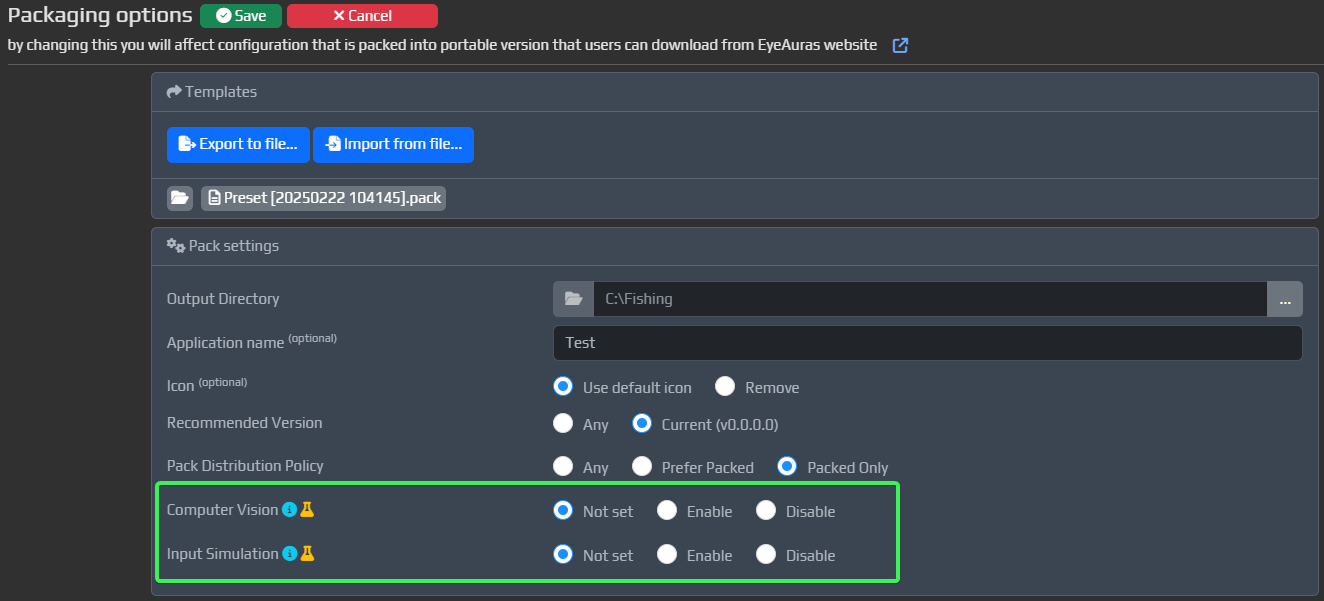
- Computer Vision - All types of capture-related functionality (Image/Color/ML Searchers, etc)
- Input Simulation - Send Sequence/KeyPress/MouseMove and all other input-manipulation actions. p.s. Note that HotkeyIsActive is still available
How much does it save?
- Computer Vision - heavy-hitter, could save around 300MB of RAM and 3-5 seconds of startup time.
- Input Simulation - light-weight in comparison, but, more importantly, by not loading input-related libraries, you make the app appear more legit to all external observers. This could be very important if you decide to distribute your pack not as an automation tool, but as computer-vision-based helper.
How to set this up?
Blacklist is a part of Pack configuration. By default, everything is shipped, but you can disable two types of modules/
Bugfixes/Improvements
- none this time