Review a pack before allowing its reactions
Inspect a prepared pack’s version, permissions, visible logic and dependencies, then decide whether to configure it or defer import.
Decide whether a pack is ready for your own setup
Finish with an explicit decision: the pack fits your prepared environment, needs specific configuration, or must wait for missing information. Review it before importing into a working tree. A publication name or successful download does not establish what its actions will do.
Use your own non-sensitive test profile and a pack file you already have permission to inspect, ideally a small set of your own. For a publication, have its normal link and author requirements available. This recipe needs no account changes or execution. Private content may prevent a complete review; treat that as unresolved rather than evidence of safety.
Inspect before applying
-
Open Import → Source → Import from file → Open... and choose your prepared JSON. For an already available publication, paste its normal link in Source, inspect the author/name, then use Download to obtain Preview. Opening the source is not the final Import operation.
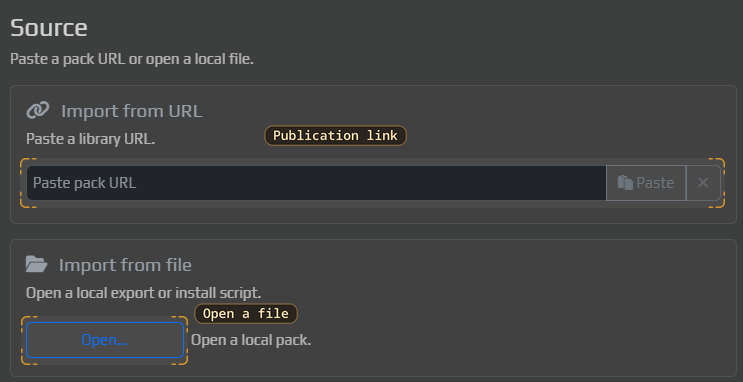
For saved JSON, choose Open… under Import from file.
-
For a publication, inspect Overview and Pack Options: record the author, displayed rev., required client version and the author's stated windows, language, files, resources and optional modules. A local JSON without publication metadata does not acquire an author revision or update subscription; compare it with the supplied requirements instead.
-
In Preview, expand the folders and select each relevant aura or folder. Inspect the visible Enabling Conditions, Triggers, actions and overlays. Note unloaded items, scripts, image/audio data and external paths. Read accessible scripts and resource declarations where available; the preview is not a complete execution trace or a guarantee every dependency is exposed. Item is not browsable, missing requirements or unavailable code are reasons to stop and ask the author through your normal process, not to assume harmless behavior.
-
Separate folder permissions from execution. Read-Only does not prohibit running configured logic; Private Content can hide it. Check inherited restrictions. A library listing, download access, permission to edit and a license requirement are separate facts; do not unlock or change ownership just to finish this review.
-
In Import Options, inspect update/subscription and conflict choices. Copy preserves existing objects with distinct IDs; Replace replaces conflicts, not individual fields; Ignore Conflicts may leave an incomplete set. A subscription applies the current publication too. Do not click Import or a conflict-resolution application button while requirements remain unclear.
Turn the review into a decision
Make a short local note for the chosen file/revision:
| Check | What you must identify |
|---|---|
| Condition and reaction | Actual source data, enabling permission, On Enter/While Active/On Exit work and any automatic tree/macro entry |
| References and resources | Included and external aura links, property-binding sources, embedded resources, files, optional models/providers and their availability |
| Target defaults | Intended Target Window and which capture/action properties inherit or explicitly override it |
| Access and version | Inspectable contents, permitted settings, matching client/components and stated license requirements |
Choose defer and close the dialog if anything necessary is hidden or unavailable. The working tree remains unchanged because you have not applied the import. If all requirements are understood, your result is a concrete configuration plan, not a security certificate: for example, “set folder Target Window to my document; verify both capture bindings; keep the prepared reaction disabled until checked.” Do not assume a selected destination folder overrides imported paths or that Import has a universal safe/disabled mode.
When you deliberately proceed later, apply the chosen conflict/update policy only in your own test profile and verify actual loading/enabling before any reaction. Use Export/Import for application of the set, Defaults and Bindings for source→target values, and Enabling Conditions for permission to work. Choosing a capture window does not grant input focus or delivery. Aura Library helps discover publications; Permissions explains visibility/edit rights without promising unseen contents are safe.