Retry your readiness check until one deliberate run completes
Resume a failed condition through Until Success and play one cue when that manually driven pass succeeds.
Retry readiness, then finish one controlled pass
Keep one behavior-tree pass at your own readiness check until it succeeds, then play a single cue and stop issuing ticks. This is one cue per deliberately completed pass, not a once-ever notification under an automatically looping Main tree.
You need the Behavior Tree editor with Sequence, Until Success, Aura Is Active and Run Aura, plus audible output. Use your own manually controlled state, not an assumed application's readiness API.
Prepare an explicit source and sound
- Create a root New Aura → Retry ready. Add Fixed Value in Triggers, initially Is NOT Active; no actions or overlays. Keep it loaded and enabled.
- Create another loaded, enabled aura Retry cue, also with Fixed Value → Is NOT Active. In On Enter, add exactly one Play Sound with Audio notification → Ping, Volume 50%, Play in background off. Preview it; leave While Active, On Exit and Overlays empty. Do not change Retry cue's Fixed Value during the exercise.
- Create New Behavior Tree. Select My Tree, enable Activation → Is Loaded, and choose Execution → When Activated → Do nothing. Leave automatic activation conditions empty. Do not start a repeat control: each attempt below comes from the same upper Tick BT Once button.
Connect the retry before the cue
-
Through Add new Node, add Sequence, Until Success, Aura Is Active and Run Aura. Connect them exactly as below. Sequence has two enabled children, left to right: Until Success and Run Aura. Until Success has only Aura Is Active as its child.
-
In Aura Is Active, use General → Links → Edit to select only Retry ready, require must be Active, and set Operator → All must match (AND). Leave it without a child.
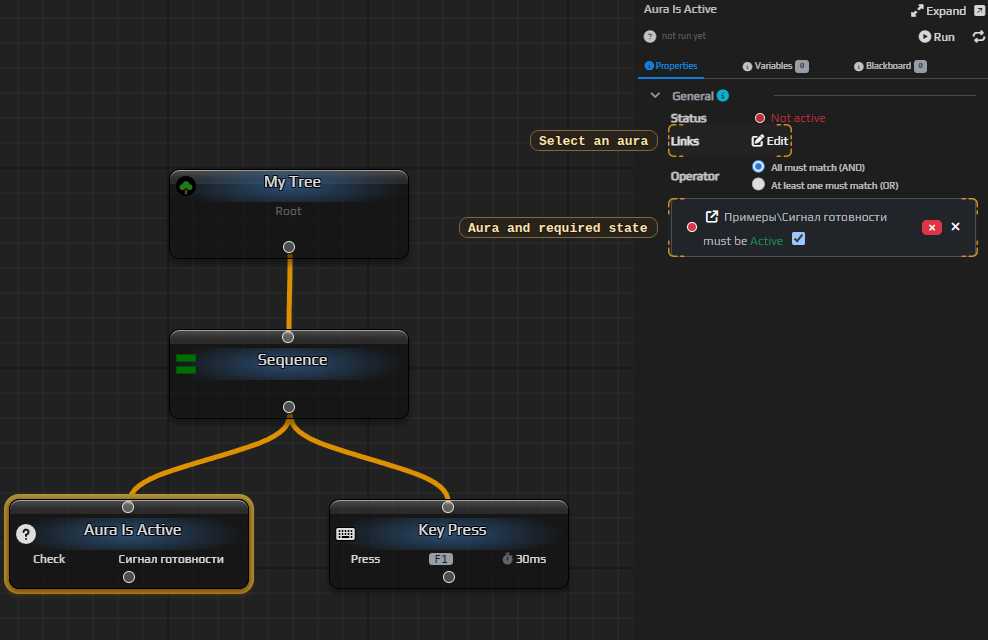
This screenshot links a sample aura named Сигнал готовности. Use Edit to select Retry ready in this tree.
-
In Until Success, check General → Child identifies that condition. In Run Aura, choose General → Auras → Links → Retry cue, verify 1 action, and select Strategy → run 1-by-1 in order of addition.
My Tree
└─ Sequence
   ├─ Until Success
   │  └─ Aura Is Active: Retry ready must be Active
   └─ Run Aura: Retry cue, ordered, 1 action
- With Retry ready known Not Active, click the upper Tick BT Once. The check returns Failure, but Until Success and Sequence return Running. No cue should run.
- Click the same upper button again while the source remains Not Active. It makes one more check attempt and stays Running without a cue. Until Success has no internal polling loop or built-in retry delay.
- Change Retry ready to Is Active and wait until the aura shows Active. Return to the same selected tree and click the same Tick BT Once again. The check succeeds, Sequence reaches Run Aura, one Ping plays and the pass completes with Success. Now stop clicking: no further automatic cue should occur with Do nothing selected.
| Operation | Expected result |
|---|---|
| Manual tick while readiness is known false | One failed check attempt; parent Running; no cue |
| Later manual tick after readiness becomes Active | Check Success; one cue; completed pass |
| No more manual ticks, Do nothing selected | No new pass is requested |
| Another tick after Success | Starts a new pass and can sound again if readiness still matches |
To deliberately repeat, first set Retry ready to Is NOT Active, wait for that state, then start another pass with Tick BT Once. To abandon a retained Running pass, unload your own tree through Is Loaded, allow its work/cleanup to finish, and reload before a fresh run. Reset node status only clears the displayed result; it is not an execution reset. Do not switch to a node-footer Run while the original route owns its continuation.
Until Success converts each normal child Failure into Running; Sequence retains that retry stage and admits Run Aura only after success. The aura-state node reads your source without changing it. Unknown/errors/cancellation are not ordinary retries.
For automatic work, Root's Tick every is measured in ms and delays after a periodic traversal, not a fixed polling guarantee. Run once supplies one activation tick and need not finish Running work; Run periodically can begin a new pass after completion and play again. Neither is a permanent once-only latch. Keep the manual workflow here when one deliberate completion is the intended result.