Find which layer hides your linked reminder
Separate condition links, property bindings, enabling permission and overlay visibility in one owned display-only set.
Find why a linked reminder is missing
Trace a reminder through four separate layers: permission to work, its condition, the source of its words and overlay visibility. Build a small known set first; then each controlled change tells you where to inspect a similar problem in your own configuration.
You need Text, Fixed Value, the Aura Is Active trigger, Dependencies Viewer and Binding editor. Use only your own display-only auras, loaded and enabled, with EyeAuras unpaused. Preserve an export before experimenting on an existing important set.
Build a known dependency and text binding
-
Create a root New Aura → Message source with Fixed Value → Is Active and a Text overlay. Set Content to
Review notes, Font 24, Size to fit off. Unlock and place a readable rectangle, then enable Locked. Leave actions empty. -
Create a root New folder → Reminder group. In its Enabling Conditions, add only Fixed Value → Is Active. Inside it create Linked reminder with ordinary Triggers → Aura Is Active. In Links, select only Message source, require Active, and choose Logical operator → All must match (AND).
-
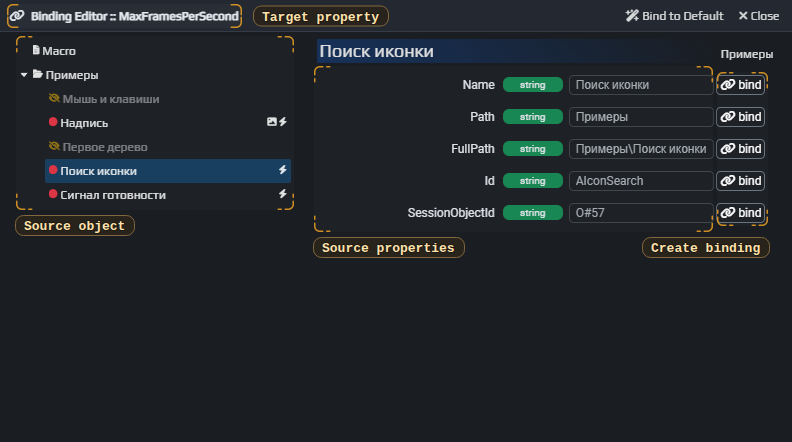
Add Text to Linked reminder with Font 24/Size to fit off. Click its Content binding indicator. In Binding editor, select Message source on the left; on the right expand Overlays → Text → Content and click bind. This connects a string source to a string destination, not the reverse direction. Place this overlay away from the source and lock it.
The editor shown is open for a capture-rate property. For this step open it from Content, then use the same source tree and bind column.
-
Outside Reminder group, create Graph with Fixed Value → Is Active and Dependencies Viewer. In the overlay's Graph → Auras → Links, select Linked reminder. Enable Show dependencies and Show connections; place the graph away from the text. Its connection identifies the aura-state dependency, not the Content binding.
-
Open Show event log → Event Viewer before making changes. Show filters, enable Auras, set Level → Info, clear the text filter and unpause the panel.
Isolate one layer at a time
- Change Message source's Content to
Review complete. Both visible Text overlays should update. If only the original changes, inspect the destination's binding indicator and selected source property. A red indicator or conversion error needs its own explanation; graph edges do not validate property bindings. - Set Message source's Fixed Value Is NOT Active. Select an aura outside the group and leave the editor. Linked reminder should hide. Restore Is Active and it should return. The dependency edge remains structural; check the trigger's reported state and Event Viewer messages/context, not graph colors.
- Set Reminder group's Enabling Conditions → Fixed Value → Is NOT Active. Again select away and leave the editor: its child is not permitted to work even though Message source is Active. Restore the folder's Is Active permission.
- If a reminder remains visible during a negative check, inspect Locked and the currently selected editing context. For normal observation use Window → Mode → Overlay, Opacity 100%, a visible position and Locked on. An unlocked or selected editor preview can stay visible independently of the normal condition.
| Symptom | Inspect first |
|---|---|
| Child is unloaded or not permitted to work | Its loading, parent permission and pause, before ordinary trigger results |
| Loaded, allowed child has a false/Unknown condition | Aura Is Active's actual Links, expected state and source aura |
| Condition is correct but words do not follow | Content's binding source→target and compatible string type |
| Words/state are correct but display is missing or misleading | Position, opacity, locking and selected-editor preview |
Enabling Conditions, Bindings and common overlay options control different layers. Dependencies Viewer supplies structure; its activity/busy colors and stored arrangement choices are not live confirmation. Event Viewer shows only reported entries accepted while open and enabled, not a complete audit or proof that an external action completed. This set has no actions: finish with permission and source both Active and the two matching reminders visible.