Check your readiness state before invoking a notification
Use a behavior-tree Sequence to admit one prepared sound only when your own state aura is Active.
Check readiness before calling a sound list
Use your own manual readiness state to decide whether a behavior tree may invoke one sound. A failed check ends this Sequence without calling the notification. This is different from letting the notification aura react to its own trigger transition.
You need the Behavior Tree editor, the Sequence, Aura Is Active and Run Aura templates, and an audible output. Use a separate sound-only configuration with EyeAuras unpaused; no script, application input or game data is involved.
Prepare the condition and the reusable action
- Create New Aura → Ready state. Add Triggers → Fixed Value → Is NOT Active, with no actions or overlays. This is the only data source for the check.
- Create New Aura → Ready cue. Give it its own Fixed Value → Is NOT Active so it will not play from normal activation. Keep both auras loaded and enabled.
- In Ready cue's On Enter, add one Play Sound: Audio notification → Ping, Volume 50%, Play in background off. Preview the sound. Keep While Active and On Exit empty; the aura must supply exactly one action. Its inactive state does not prohibit a separate Run Aura invocation.
Build the guarded route
-
In the aura tree's creation menu choose New Behavior Tree and open it. Select My Tree and set Activation → Is Loaded on, Execution → When Activated → Do nothing. Add no automatic activation links.
-
Through Add new Node, add Sequence, Aura Is Active and Run Aura. Connect My Tree to Sequence, and Sequence to the other two as children, Aura Is Active on the left and Run Aura on the right. Leave both children without their own continuations.
-
Select Aura Is Active. In General → Links → Edit, select only Ready state, keep must be Active, and choose Operator → All must match (AND). Verify that this actual link is present; an empty link list is not your readiness check.
-
Select Run Aura. In General → Auras → Links, select only Ready cue. Check 1 action and choose Strategy → run 1-by-1 in order of addition.
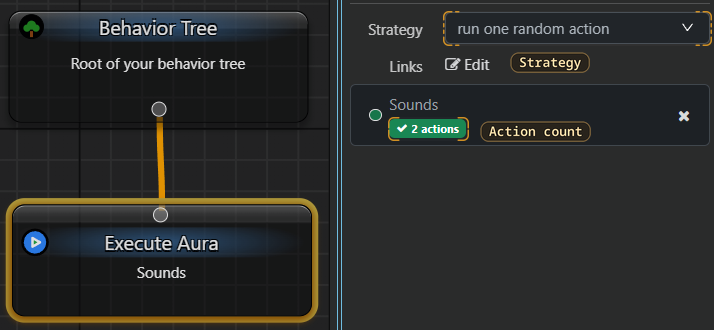
In the earlier editor, Sounds has two actions and the selected strategy picks one at random. Here the cue should have one action, with Strategy set to run in order.
My Tree
└─ Sequence
   ├─ Aura Is Active: Ready state must be Active
   └─ Run Aura: Ready cue, ordered, 1 action
- With Ready state still Is NOT Active, click the upper Tick BT Once, not Run in an individual node's footer. Expect Failure at the check and no sound; the Sequence must not execute its second child.
- Change Ready state's Fixed Value to Is Active, wait until that aura shows Active, then return to the same selected tree and click Tick BT Once again. Expect the check to succeed, one Ping, then a completed Success. Ready cue itself may remain inactive throughout.
- Return Ready state to Is NOT Active, wait for that known state and tick again: the check should fail without a cue. Another tick while Ready remains Active would be a new attempt and could play again; this is not a once-ever latch.
Sequence supplies the stopping rule; Aura Is Active reads your configured aura state; Run Aura calls its target's action lists. Success/Failure/Running are node results, not aura Active/Not Active/Unknown. Unknown at this aura-state check is an error to inspect, not a confirmed false readiness result.
Keep the same entrypoint for an unfinished route and wait for an issued call to finish. This example's check has no Running child; adding long work later would not make Sequence continuously recheck earlier successful conditions. Root explains manual versus automatic Main execution, and the first tree guide explains connections. Successful sound calls still do not independently confirm that an external application processed anything.