Delay an observed warning before playing its cue
Use Debounce to hold a manually sampled warning for 1000 ms before admitting a sound.
Delay a warning you have actually checked
Give your own warning a one-second admission delay before playing Ping. A sampled false result restarts that delay. This controlled example shows what Debounce observed on your ticks; it does not prove that an external signal stayed true between them.
You need the Behavior Tree editor with Debounce, Sequence, Aura Is Active and Run Aura, plus audible output. Use a separate sound-only set with EyeAuras unpaused.
Prepare the warning and its cue
- Create New Aura → Warning source at the root. Add Triggers → Fixed Value → Is NOT Active, with no actions or overlays. Keep it loaded and enabled.
- Create another loaded aura Warning cue, also Fixed Value → Is NOT Active. In On Enter, add exactly one Play Sound: Audio notification → Ping, Volume 50%, Play in background off. Check its sound preview. Leave While Active, On Exit and Overlays empty; do not activate this cue aura during the exercise.
- Create New Behavior Tree. Select My Tree, enable Activation → Is Loaded, and choose Execution → When Activated → Do nothing. Add no automatic activation links and do not start the repeat control.
- Through Add new Node, build the following connections, arranging Sequence's children left to right. The Aura Is Active check has no child.
My Tree
└─ Sequence
   ├─ Debounce
   │  └─ Aura Is Active: Warning source must be Active
   └─ Run Aura: Warning cue, ordered, 1 action
- In Aura Is Active, use General → Links → Edit to select only Warning source, require must be Active, and choose All must match (AND). In Run Aura, choose General → Auras → Links → Warning cue, verify 1 action, and select run 1-by-1 in order of addition.
- Configure Debounce as follows; turn randomization off for both timeout fields. Check Child identifies your aura-state check.
| Debounce setting | Value |
|---|---|
| General → Behavior | Wait until Stabilizes |
| Activation Timeout | 1000 ms |
| Deactivation Timeout | 1000 ms |
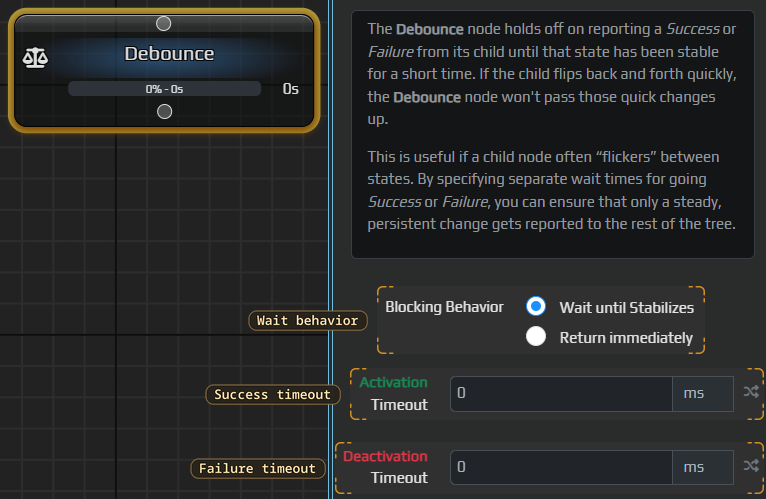
Both timeouts are zero in the screenshot. Enter 1000 ms in each field for this exercise.
Observe admission, rejection and re-entry
- Set Warning source to Is Active, wait for its known Active state, then click the upper Tick BT Once. Debounce and Sequence return Running, without Ping.
- Set the source to Is NOT Active, wait for that state, and use the same upper tick. The observed Failure clears the pending activation and starts the deactivation interval. Debounce returns Running; after more than one second, another tick while still false returns Failure, with no cue.
- Set the source Active again and tick. A fresh activation interval starts with Running. Leave it Active, wait more than one second, and tick again: Debounce succeeds, one Ping plays and Sequence finishes with Success. Stop issuing ticks.
For a deliberate repeat, first set the source Not Active and tick to observe it, then set Active and repeat the timed admission. A completed Success does not clear Debounce's elapsed timer: another tick while the source is still Active can sound immediately. Unload your own tree and allow cleanup before reload if you need a full execution reset; Reset node status only clears display.
Debounce filters sampled results, Aura Is Active reads your source, and Sequence admits Run Aura only after Success. Keep the check childless: Running passes through Debounce without clearing its timers. Missed changes between ticks are invisible. Return immediately is a different mode that returns the opposite terminal result while pending; it is not used here. Unknown or a check error is not a verified false warning.