Choose a preferred notification or a fallback sound
Use two checked Sequence alternatives under Selector to hear which eligible branch completed.
Hear which alternative was selected
Play Ping when your preferred check succeeds, otherwise Bell when the fallback check succeeds. If neither qualifies, play nothing. Start with results you set yourself, so the choice is understandable before connecting a real sensor.
You need Behavior Tree templates Selector, Sequence, Fixed Status, Run Aura, and an audible output. Use a new sound-only set with EyeAuras unpaused.
Prepare two distinct cues
- Create New Aura → Preferred cue. Add Triggers → Fixed Value → Is NOT Active. In On Enter, add exactly one Play Sound, choose Audio notification → Ping, Volume 50%, and turn Play in background off. Check its preview. Keep While Active, On Exit and Overlays empty.
- Create Fallback cue the same way, but choose Bell. Keep both auras loaded, enabled and inactive: the tree will invoke their actions separately from ordinary activation.
- Create New Behavior Tree, select My Tree, enable Activation → Is Loaded, and choose Execution → When Activated → Do nothing. Do not add automatic activation links or run the repeat control.
- Through Add new Node, build this tree. Selector has two Sequence children, Preferred on the left. Each Sequence contains its check first and its Run Aura second. All nodes are enabled; the leaves have no children.
My Tree
└─ Selector
   ├─ Preferred: Sequence
   │  ├─ Fixed Status: Failure
   │  └─ Run Aura: Preferred cue, ordered, 1 action
   └─ Fallback: Sequence
      ├─ Fixed Status: Success
      └─ Run Aura: Fallback cue, ordered, 1 action
-
Set each Fixed Status through General → Status as shown. For each Run Aura, open General → Auras → Links, select only its cue, verify 1 action, and choose Strategy → run 1-by-1 in order of addition.
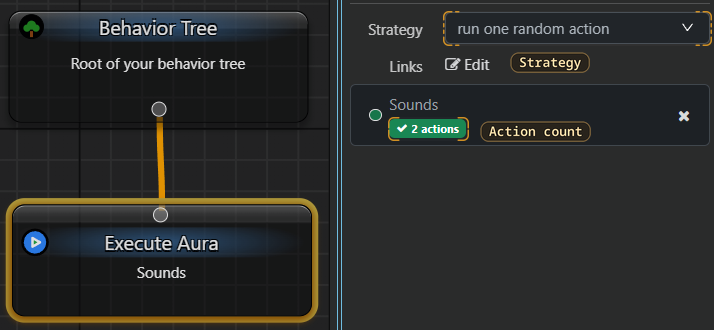
Sounds has two actions here. In your tree, check each branch separately. Each Run Aura should list one action from its own cue.
Change the eligible branch
- Click the upper Tick BT Once. Preferred's check fails; its Ping is skipped. Fallback succeeds, Bell plays and Selector returns Success.
- Set Preferred's Fixed Status to Success and tick again. Ping plays; Selector stops at that successful Sequence and does not play Bell.
- Set both checks to Failure and tick: Selector returns Failure, without either cue. Restore Preferred Failure/Fallback Success for the first result again. Do not change the cue auras' inactive triggers.
| Choice | Why it is needed |
|---|---|
| Sequence around each check and cue | A successful check directly under Selector would finish the choice before its separate cue |
| Horizontal left-to-right order | Determines which eligible alternative is tried first |
| Manual tick after a terminal result | Starts another deliberate pass, so it can play again |
Selector tries another child after Failure; Sequence stops before its cue after Failure. Fixed Status supplies controlled results, and Run Aura invokes the prepared lists without changing their aura activity.
If a branch returns Running, Selector resumes that branch on the next tick; it does not automatically preempt it when an earlier alternative becomes eligible. Completed effects are not rolled back. To use actual readiness later, replace a check with childless Aura Is Active, explicitly link your tested source and choose its expected state. Unknown/errors are not a normal failed preference. This manual example supplies no game data or permanent once-only latch.